TTFT, ITL, Goodput: Measuring What Users Feel
We loaded one LLM server with more and more requests per second and watched two numbers. Throughput, the requests it completed per second, rose to 1.42 and then stayed flat. Goodput, the requests completed within a chat-grade latency target, never exceeded 0.43, and was zero from 1.5 requests per second on; at the throughput peak, not one request met even a relaxed 5-second target. Both numbers come out of the same benchmark run, once you know what each latency metric measures.
What a user waits for
A streamed answer gives the user two experiences: waiting for it to start, then reading it as it arrives. The metrics split along the same line. Here is one real request, measured from the client: 1,024 prompt tokens, 256 answer tokens, Qwen3-8B in BF16 on vLLM 0.31.0 on an NVIDIA GB10, with about a dozen other requests in flight.
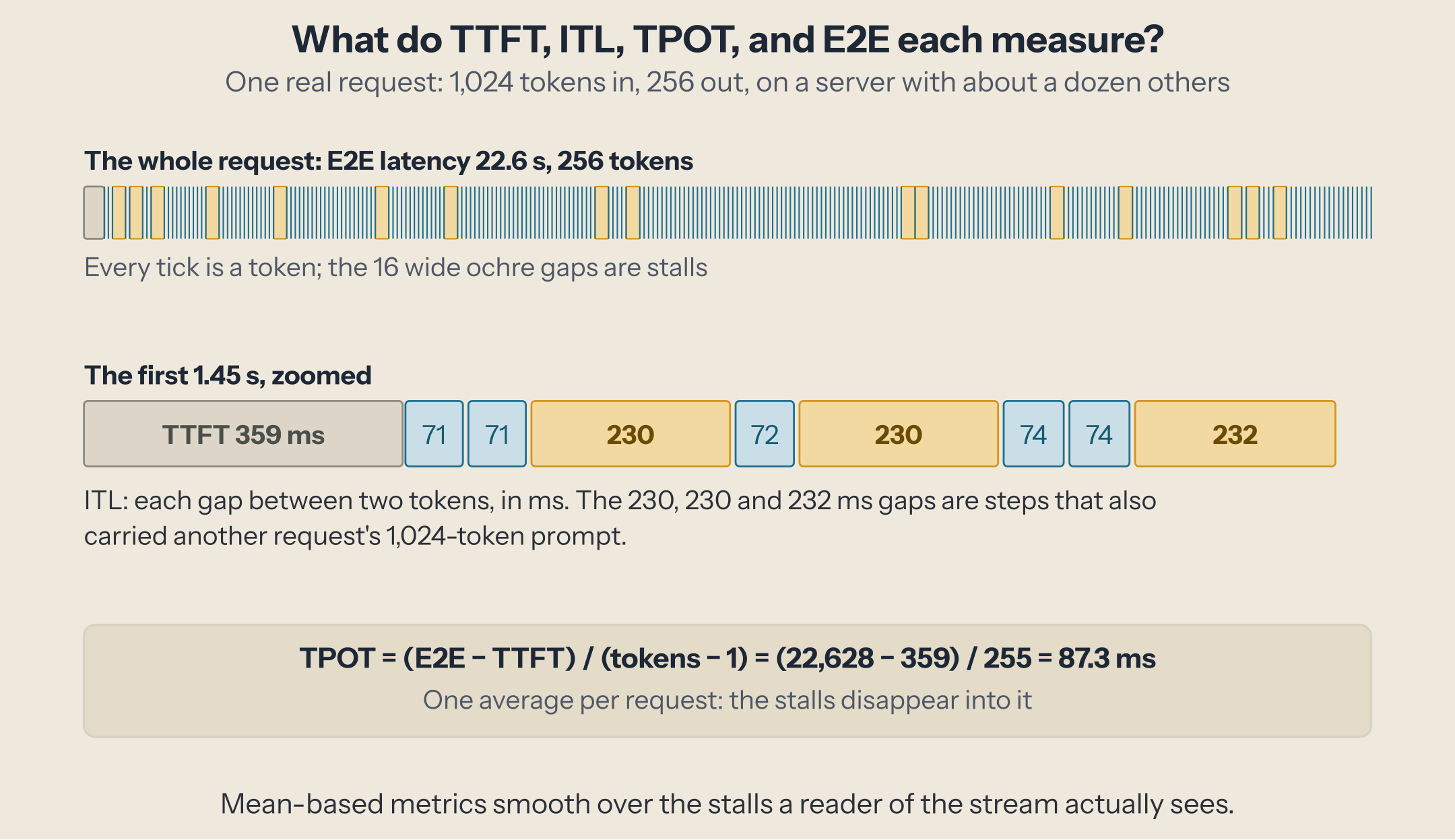
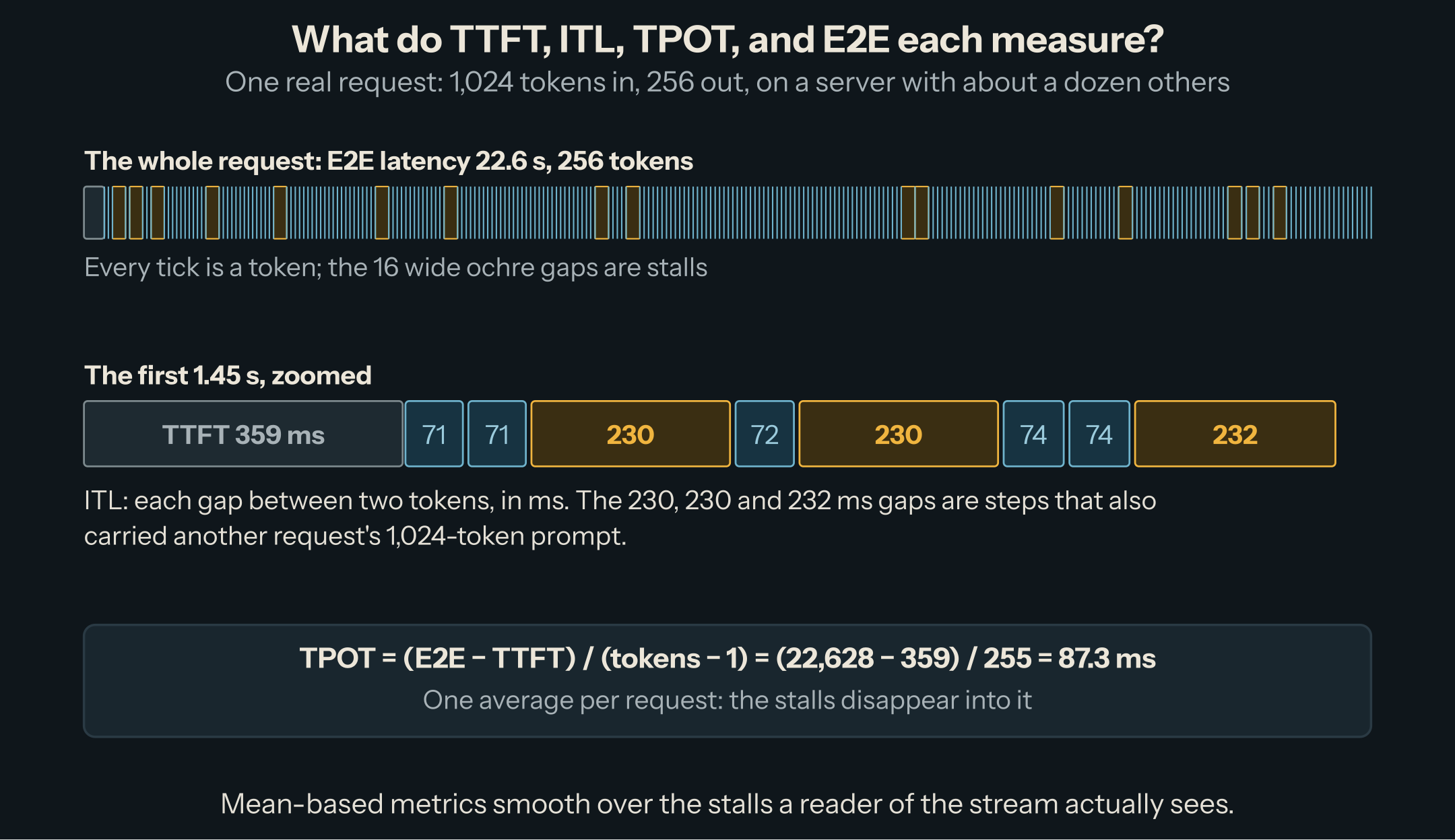
- Time to first token (TTFT): from sending the request to receiving the first token. Here 359 ms. It covers the queue, the prefill of the prompt, and the trip through the server (each stage timed here). It is what makes an interface feel responsive or not.
- Inter-token latency (ITL): every gap between two consecutive tokens. Here most gaps were 71 to 85 ms, and 16 of them were 229 to 245 ms: the steps that also carried another request's 1,024-token prompt (16 other requests arrived while this one streamed). A reader sees those as the stream stuttering.
- Time per output token (TPOT): one number per request, (end-to-end latency − TTFT) / (output tokens − 1). Here 87.3 ms. It is the average of that request's gaps, so the stalls dissolve into it.
- End-to-end latency (E2E): from sending to the last token. Here 22.6 s. It matters when a program, not a person, consumes the answer: an agent step, a batch job, a function call that returns JSON.
These are the definitions vllm bench serve uses: TTFT and each ITL come from the timestamps of the streamed chunks (source), TPOT is computed per request from latency and TTFT (source). Other tools differ in details that change the numbers: whether the first token counts in the average, whether empty chunks count as tokens. NVIDIA's comparison of GenAI-Perf and LLMPerf lists them; compare numbers only from the same tool.
Percentiles, not means
The same sweep at 1 request per second, as vllm bench serve reports it (trimmed):
Request throughput (req/s):              0.81
Request goodput (req/s):                 0.43
Output token throughput (tok/s):         208.46
---------------Time to First Token----------------
Mean TTFT (ms):                          434.23
P50 TTFT (ms):                           404.65
P99 TTFT (ms):                           785.44
-----Time per Output Token (excl. 1st token)------
Mean TPOT (ms):                          100.91
P50 TPOT (ms):                           99.37
P99 TPOT (ms):                           113.81
---------------Inter-token Latency----------------
Mean ITL (ms):                           100.91
P50 ITL (ms):                            87.77
P99 ITL (ms):                            288.01
Mean TPOT and mean ITL are identical, 100.91 ms, only because every answer here has exactly 256 tokens: TPOT averages per request and ITL per gap, so with mixed lengths the long answers pull mean ITL toward their own speed. Their 99th percentiles tell different stories. P99 TPOT is 114 ms: the worst requests streamed only a little slower on average. P99 ITL is 288 ms: the stalls. In this run, 7.9% of all gaps lasted more than 150 ms, and 89 of the 90 requests had at least one. If your users complain that answers freeze for a moment, TPOT will never show it; ITL's tail will.
The general rule: report the 50th and the 99th percentile, never only the mean. At 1 request per second they are close; at higher load, the gap between them becomes the whole story.
Throughput rises, goodput doesn't
We swept the offered load from 0.5 to 4 requests per second, Poisson arrivals, 1,024 tokens in and 256 out, with the server's default scheduler settings, a new set of prompts at each load point.
| Offered (req/s) | Completed (req/s) | Output tok/s | TTFT p50 / p99 | TPOT p50 / p99 | ITL p99 |
|---|---|---|---|---|---|
| 0.5 | 0.43 | 110 | 375 / 646 ms | 81 / 88 ms | 240 ms |
| 1 | 0.81 | 208 | 405 / 785 ms | 99 / 114 ms | 288 ms |
| 1.5 | 1.15 | 296 | 675 / 2,008 ms | 171 / 218 ms | 661 ms |
| 2 | 1.33 | 341 | 1.5 / 3.2 s | 302 / 357 ms | 889 ms |
| 2.5 | 1.42 | 365 | 2.3 / 16.5 s | 403 / 458 ms | 1,231 ms |
| 3 | 1.40 | 357 | 8.7 / 45.4 s | 495 / 581 ms | 1,351 ms |
| 4 | 1.36 | 347 | 22.1 / 131.1 s | 611 / 729 ms | 1,234 ms |
Throughput climbs to 365 output tokens per second at 2.5 requests per second offered, then flattens: past that point, requests arrive faster than they finish, the queue grows for as long as the overload lasts (a p99 TTFT of 131 s at 4 requests per second), and the completed rate stays where it was. Long before that, latency has collapsed. From 1 to 2.5 requests per second, TPOT quadruples (99 to 403 ms). Bigger batches add a little to each step; most of the increase is prefill: more requests arrive per second, so more steps also carry someone's 1,024-token prompt. The share of gaps longer than 150 ms goes from 8% at 1 request per second to 91% at 2.5. That is the interference chunked prefill and continuous batching settings trade against.
Goodput turns this into one number: the requests per second that meet every latency target you set, a service level objective (SLO), introduced as the target metric for LLM serving by DistServe. vllm bench serve --goodput ttft:1000 tpot:100 counts a request as good only if its TTFT is at most 1 s and its TPOT at most 100 ms (source). 100 ms per token is ten tokens a second, faster than most people read.
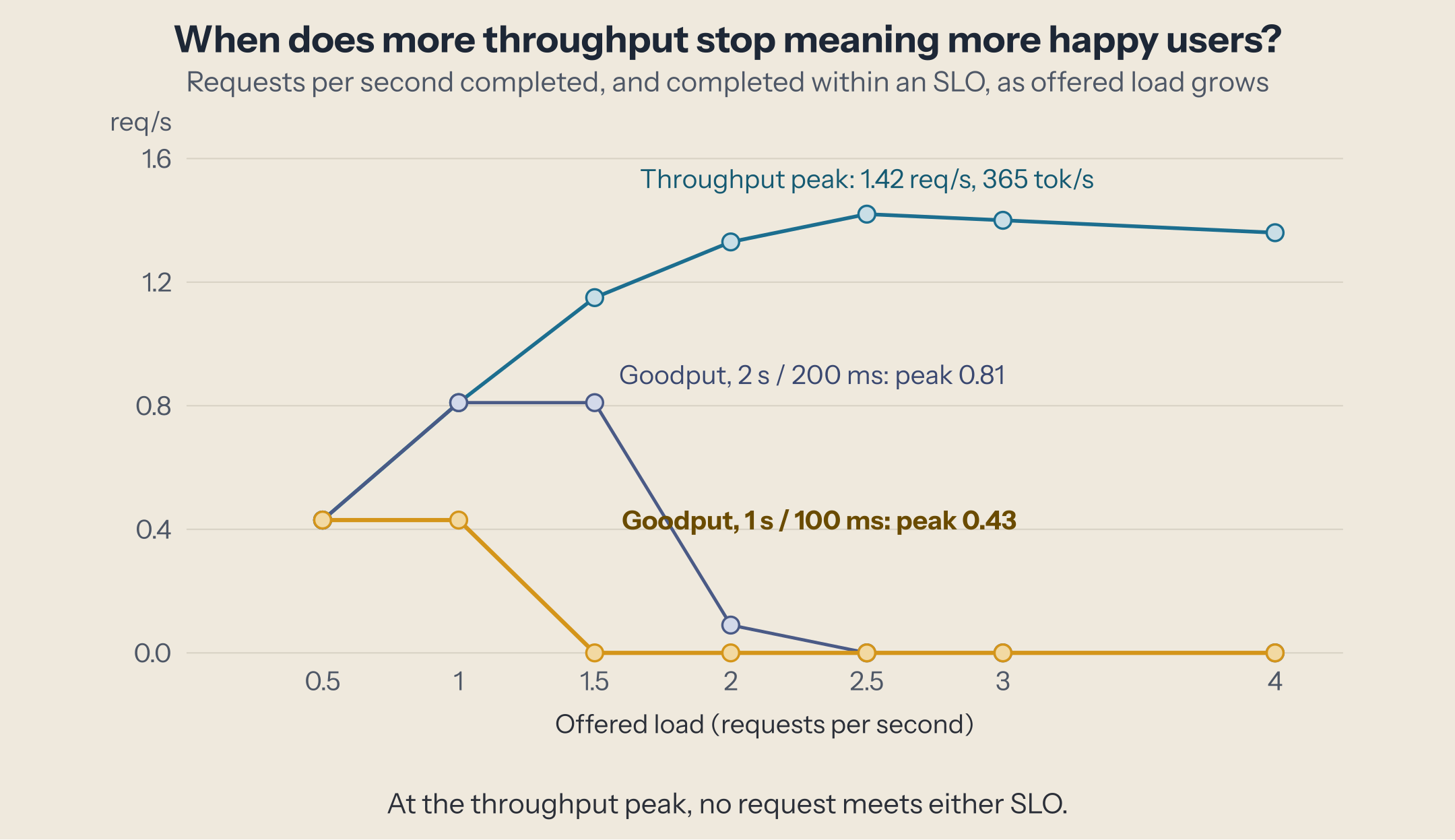
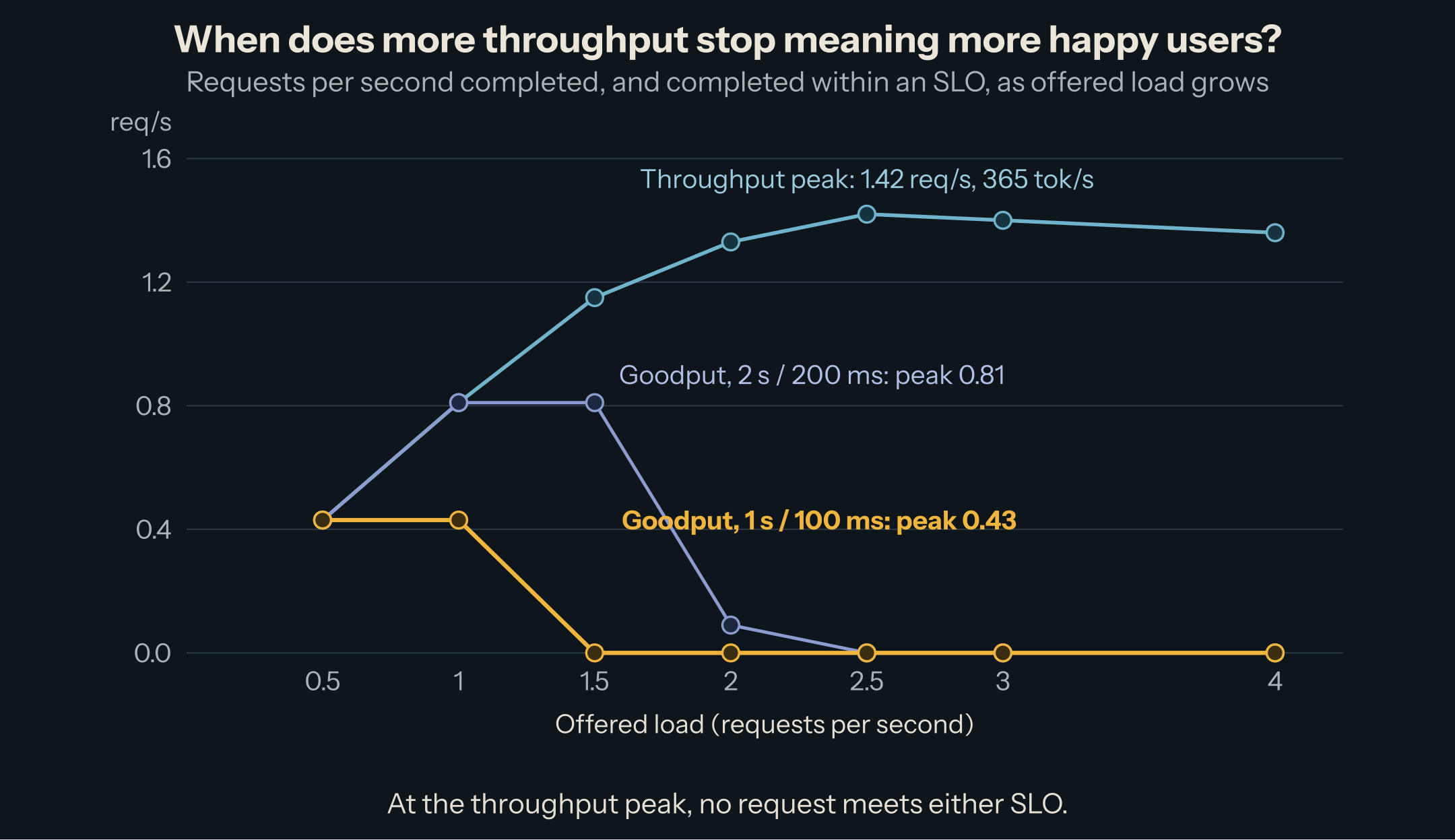
Goodput depends on the SLO, and the SLO depends on who reads the answer. We computed it for three targets from the same run:
| SLO (TTFT / TPOT) | Peak goodput | At offered load | Output tok/s at that point |
|---|---|---|---|
| 1 s / 100 ms (chat) | 0.43 req/s | 0.5 req/s | 110 |
| 2 s / 200 ms (relaxed chat) | 0.81 req/s | 1 to 1.5 req/s | 208 to 296 |
| 5 s / 300 ms (background work) | 1.15 req/s | 1.5 req/s | 296 |
| none (throughput) | 1.42 req/s | 2.5 req/s | 365 |
At the throughput peak, no request met any of the three targets. A chat service sized from the benchmark's headline throughput would need more than three times the GPUs it was budgeted for (1.42 / 0.43). This is why a capacity plan starts from the SLO and reads goodput, not the peak tokens per second a benchmark prints first.
Goodput also tells you what an optimization is worth. A change that raises throughput but stretches the ITL tail can lower goodput; chunked prefill settings trade TTFT against ITL; disaggregated serving exists because separating prefill from decode can hold both targets at a load where a single pool misses one of them.
Measuring it yourself
The server, with default scheduler settings (chunked prefill and prefix caching on):
$ vllm serve Qwen/Qwen3-8B \
    --port 8001 \
    --gpu-memory-utilization 0.70 \
    --max-model-len 32768
Then one load point at a time:
$ vllm bench serve --backend vllm --port 8001 --model Qwen/Qwen3-8B \
    --dataset-name random --random-input-len 1024 --random-output-len 256 \
    --random-range-ratio 0 --ignore-eos \
    --num-prompts 90 --request-rate 1 --seed 2 \
    --percentile-metrics ttft,tpot,itl,e2el --metric-percentiles 50,90,99 \
    --goodput ttft:1000 tpot:100 \
    --save-result --save-detailed --result-dir results --result-filename rate-1.json
--request-rate sends requests at random (Poisson) intervals averaging that rate, which is how independent users arrive. --max-concurrency instead caps how many are in flight, and the time a request waits for a free slot is left out of its TTFT, which hides queueing: the wrong model for an interactive service. --ignore-eos makes every answer exactly 256 tokens, so load points are comparable. Give every load point its own --seed: with the same seed, each point sends the same prompts as the last one, the server's prefix cache recognizes them, and TTFT drops to a cache hit's 85 ms. --save-detailed keeps every request's TTFT, ITL list, and latency, which is what lets you recompute goodput for another SLO without rerunning:
import json

d = json.load(open("results/rate-1.json"))
good = sum(1 for ttft, lat, n in zip(d["ttfts"], d["latencies"], d["output_lens"])
           if ttft <= 2.0 and (lat - ttft) / (n - 1) <= 0.200)
print(f"goodput at 2 s / 200 ms: {good / d['duration']:.2f} req/s")
Use your real prompt and answer lengths if you know them: goodput at 200 output tokens and at 2,000 are different numbers.
In production, the server exports the same quantities as Prometheus histograms on /metrics: vllm:time_to_first_token_seconds, vllm:inter_token_latency_seconds, vllm:request_time_per_output_token_seconds, vllm:e2e_request_latency_seconds, and vllm:request_queue_time_seconds (source). They are measured inside the server, so they leave out the network and your gateway: compare them with client-side numbers once, so you know the offset.
Gotchas
Repeated prompts measure the cache, not the server. Our first clean-memory sweep used the same seed at every load point. Each point replayed the previous point's prompts, the prefix cache served most of them, and TTFT at 1 request per second looked 40% better than it is. Check that no TTFT is suspiciously close to a decode step.
Watch the machine, not only the server. Another first attempt gave the server 85% of a GPU whose memory is shared with the CPU and other services. Above 2 requests per second the host ran out of memory and started swapping, the 3 requests per second point showed a median TPOT of 950 ms that had nothing to do with the GPU, and at 4 the engine died. Read Failed requests in every result and check host memory during the run; discard any point where either moved.
A benchmark's duration is part of its result. Goodput is good requests divided by the run's wall time, and the run ends when the last request finishes. Past saturation, a short run under-reports how bad things get: the queue keeps growing for as long as the overload lasts. Size runs so each load point lasts minutes, not seconds.
Fixed lengths are a model, not your traffic. Prompts of exactly 1,024 tokens make load points comparable, but real traffic has a long tail of long prompts, and those set your p99 TTFT and your stalls. Replay a sample of real request lengths before you commit to an SLO.
TTFT includes the queue. A TTFT regression after a deploy is often not prefill getting slower but requests waiting longer. vllm:request_queue_time_seconds separates the two.
Once you can measure goodput, the next question is which architecture raises it: disaggregated serving puts prefill and decode on separate GPUs to hold TTFT and ITL targets at once.
This post is part of the Serving in Production collection (2 of 4)

Inference engineering and AI in production — depth-first, no hype.
Inference Notes
Once a week: what changed in serving AI models, and what it means if you build, run or pay for them, in about five minutes.
Related Articles
Benchmark an Inference Server Without Lying to Yourself
Common load-test mistakes made on purpose next to the correct run, on one vLLM server, so each rule comes with how far it moves the numbers.
Measuring the Damage: Evaluations That Catch Quantization Errors
GSM8K said every 4-bit format matched BF16. A noise baseline, paired comparisons, token-level KL, and a code benchmark showed which ones did not.
Expert Parallelism, and What DeepEP Does for It
Why serving a big MoE model means spreading its experts over many GPUs, what dispatch and combine cost, and how DeepEP and its V2 redesign make it fast.