Continuous Batching, Animated: How a Server Keeps the GPU Busy
A GPU that serves one request at a time spends most of each step moving the model's weights from memory and almost no time computing. Serving engines fix that by batching requests together, but LLM requests start and finish at different times. This piece shows, step by step, how engines keep the batch full: continuous batching.
Why batch at all
Each new token takes one decode step: a pass through the whole model. On every step the GPU reads all the weights from memory (for a mixture-of-experts model, the experts in use), and the KV cache of each request. For one request, that is a lot of reading for one token, and the arithmetic units wait most of the time: at small batch sizes, decoding is limited by memory bandwidth, not by computation.
Batching changes the ratio. Run 16 requests in the same step and the weights are read once for all 16: one step now produces 16 tokens. The cost of a step grows a little (each request still reads its own cache, and there is more arithmetic), but far less than 16 times. That is why a server's total throughput climbs with the batch size, until memory for the cache or the GPU's compute runs out.
Static batching: wait for the slowest
The simple way to batch is static batching: collect a group of requests, run them together until all are done, then start the next group. It works well when every request has the same length, as in a batch job that classifies documents with one output token each.
Chat traffic is the opposite. One answer is three words, the next is three pages. In a static batch, a request that finishes early leaves its slot idle until the longest one ends, and the requests waiting outside cannot use it:
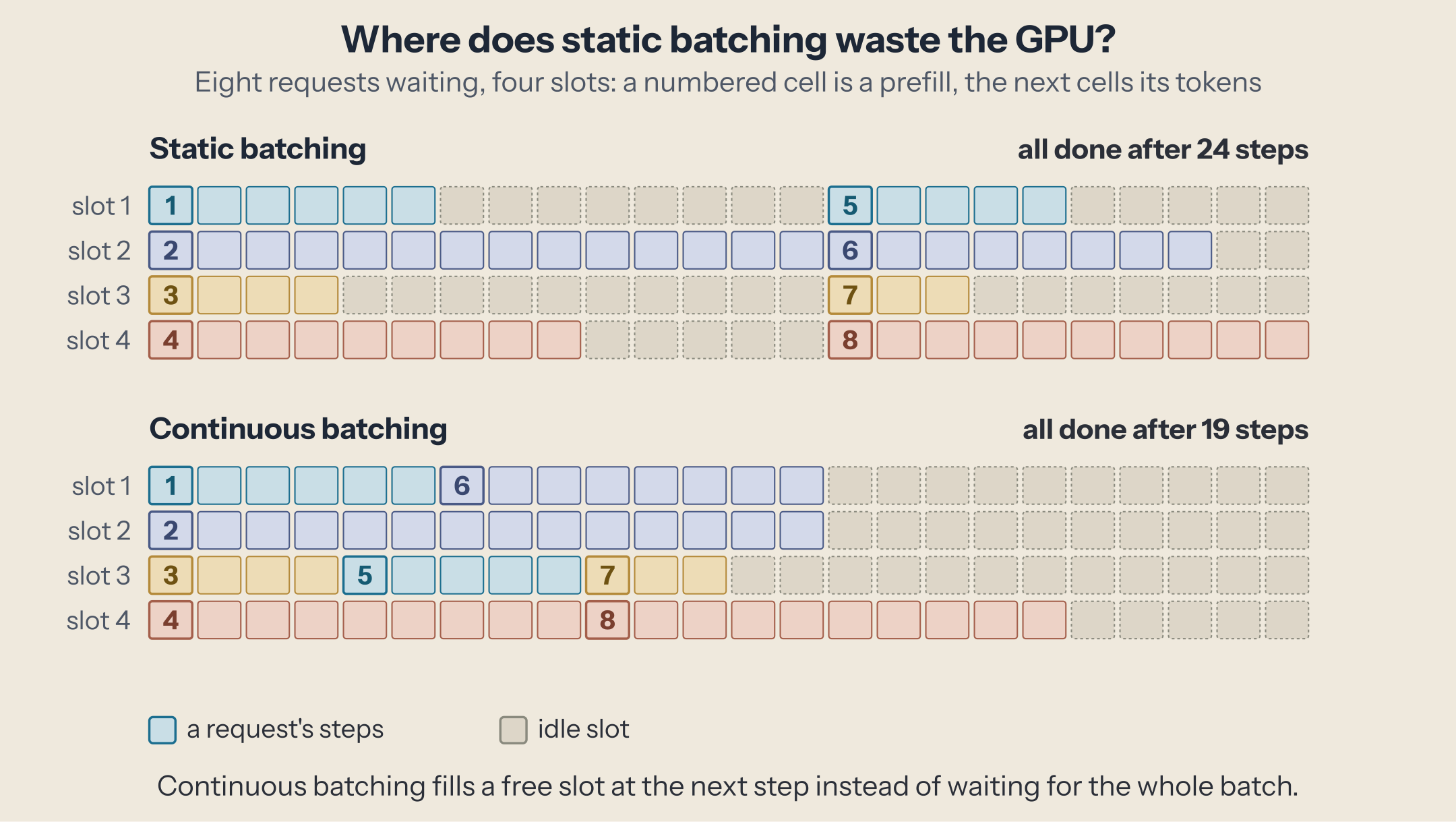
The longer and more varied the outputs, the worse it gets: the GPU spends more and more steps with empty slots, and new requests queue even though there is room.
Continuous batching: re-form the batch at every step
The fix came from the Orca paper (OSDI 2022): schedule at the granularity of one step (one iteration) instead of one request. After every step, the server checks which requests have finished, returns them immediately, and fills their slots with waiting requests before the next step. The batch is re-formed every step. The idea is called continuous batching, also iteration-level scheduling, or sometimes dynamic batching.
Run both on the same requests and compare:
Three things to try:
- Press Play with the default settings. Static batching leaves gaps after short requests; continuous batching closes them. Watch the "waiting" count: in the static lane, requests wait for a whole batch to drain.
- Set the output lengths to "all equal". The two lanes come much closer. Most of the gain comes from outputs that vary, as real ones do.
- Raise the batch slots to 8. Both lanes get faster, but the static lane wastes even more slots, because one long request now holds back seven others.
The simulator is a toy model: one step per prefill, one token per decode step, and a fixed number of slots. Real engines differ on all three, as the next section shows, but the scheduling idea is the same.
Inside a real scheduler: vLLM
vLLM's scheduler (version 0.28.0) shows what continuous batching looks like in production code. A comment at the top of schedule() states the design: "There's no 'decoding phase' nor 'prefill phase' in the scheduler." Each request just has a number of tokens already computed and a number it needs, and every step the scheduler hands out tokens to close the gap.
Each step works like this:
- Start with a token budget, the maximum number of tokens the step may process (
max_num_scheduled_tokens). - Serve the running requests first (line 523). A request that is generating needs one token; a request still reading its prompt takes a larger share of the budget.
- Admit waiting requests with what is left (line 747), up to a maximum number of running requests (
max_num_seqs). - Split long prompts. A prompt larger than the remaining budget is processed in pieces over several steps: chunked prefill, on by default. This is the main difference from the toy model: a step can mix new prompts and ongoing generations, so a long prompt does not hold up everyone else's tokens for the whole time it takes to read it.
- Preempt when memory runs out. If a running request needs a new cache block and none is free, the scheduler evicts a request to make room: with the default first-come-first-served policy, the most recently admitted one. Its cache is freed and its progress reset to zero, so it is recomputed when it is admitted again. Preemption keeps the server running, but each one costs recomputation.
Continuous batching is also what makes the memory techniques of the previous pieces pay off: because requests come and go every step, cache memory has to be handed out and reclaimed in small blocks, as it is needed. That is paged attention, the subject of the next piece.
Measured: one machine, more requests at once
We ran vLLM 0.28.0 with Qwen3-8B (BF16) on an NVIDIA GB10 (DGX Spark class) on 2026-10-04, and loaded it with vLLM's own benchmark: 512-token prompts, outputs between 26 and 486 tokens (256 on average), a fixed number of requests in flight.
$ vllm serve Qwen/Qwen3-8B --port 8001 --gpu-memory-utilization 0.85
$ vllm bench serve --model Qwen/Qwen3-8B --port 8001 \
    --dataset-name random --random-input-len 512 --random-output-len 256 \
    --random-range-ratio '{"input": 0.0, "output": 0.9}' --ignore-eos \
    --max-concurrency 32 --num-prompts 128 --request-rate inf
--gpu-memory-utilization 0.85 leaves memory for the rest of the machine, which shares it with the GPU; --ignore-eos makes every request produce exactly its planned length.
| Requests in flight | Total output (tokens/s) | Time per token, per request | Time to first token (mean) |
|---|---|---|---|
| 1 | 13.8 | 72.4 ms | 0.16 s |
| 8 | 104.0 | 72.6 ms | 0.32 s |
| 32 | 282.1 | 90.9 ms | 0.76 s |
| 128 | 509.9 | 200.1 ms | 4.31 s |
32, batching off (--max-num-seqs 1) |
13.8 | 72.6 ms | 315 s |
Four things to read in it:
- One request uses a fraction of the GPU. 13.8 tokens per second: each token requires reading the model's 16 GB of weights, and that read is most of the cost.
- Up to 8 requests, batching is nearly free. Total output rises 7.6 times while each request's tokens come just as fast: the weights are read once for all eight.
- Beyond that, it is a trade-off. At 32, total output is about 20 times higher, and each request's tokens are 26% slower. At 128, 37 times higher, but every token takes almost three times as long and the first one arrives after 4.3 s. vLLM's stats show all 128 running in the same batch with the cache only 14% full, so the limit here is the work per step, not memory.
- Without batching, the queue is the problem. With 32 requests in flight and one slot, the server produces the same 13.8 tokens per second as with a single user, and the average request waits 315 seconds for its first token. Continuous batching serves the same 32 requests about 20 times faster and starts them after 0.76 s on average.
For history: the technique comes from the Orca paper (2022), which reported 36.9 times the throughput of the best system of the time at the same latency. Today, the production engines, vLLM, SGLang, and TensorRT-LLM (which calls it in-flight batching), all batch continuously.
The knobs you control
The scheduler decides who runs; you decide how large the batch may grow.
| Engine | Most requests at once | Tokens per step |
|---|---|---|
| vLLM | --max-num-seqs |
--max-num-batched-tokens |
| SGLang | --max-running-requests |
--chunked-prefill-size (prefill chunk) |
Some things to know about them:
- vLLM picks its defaults from your GPU (
arg_utils.py), and prints the token budget at startup ("Chunked prefill is enabled with max_num_batched_tokens=…"). Read that line before tuning. - The cache can be the real limit. A high request limit does nothing if the cache memory fills first; the engine then preempts or queues. On hybrid models, the fixed-state pool can cap the batch before the token pool does, as the previous piece showed on SGLang.
The trade-off: total speed or speed per request
A bigger batch produces more tokens per second in total, but each step takes longer, so each request gets its tokens slower: on our machine, from 73 ms per token at 8 requests to 200 ms at 128. Long prompts entering the batch also slow everyone's next token for a moment, which is why engines cap the prefill tokens per step.
- Serving many users (a chat service, an API): favor the batch. Total throughput is what you pay for.
- One user who wants speed (a coding assistant on your own machine): a small batch keeps each token as fast as possible.
- Agents running in parallel against one server: they are many users. Give the server enough slots, or they will wait on each other.
Next
Continuous batching only works if cache memory can be handed out and taken back every step, in small pieces. How engines do that without wasting memory is paged attention, the next piece in this series.
This post is part of the How an LLM Request Becomes Tokens collection (5 of 10)

Inference engineering and AI in production — depth-first, no hype.
Inference Notes
Once a week: what changed in serving AI models, and what it means if you build, run or pay for them, in about five minutes.
Related Articles
From Prompt to Token: The Life of an LLM Request
One chat request followed through a real inference server, from chat template and tokens to prefill, decode, sampling, and streaming, each stage timed.
Prefill vs. Decode: Why the Second Token Is a Different Workload
Why a prompt token costs hundreds of times less than an answer token on the same weights: prefill and decode, seen in a kernel trace.
Structured Output: How Engines Force Valid JSON, Token by Token
How vLLM and SGLang guarantee valid JSON or a grammar: compiling a schema into a token mask, applying it at every step, and what it costs in latency and quality.