Chunked Prefill: Trading First-Token Time for Smooth Streaming
Someone pastes a 16,000-token document into your chat service. For a few seconds, every other user's answer freezes mid-sentence. Nothing crashed: the engine was busy reading one long prompt, and everyone else's next token waited for it. Chunked prefill is how engines avoid that freeze, and its one setting, the token budget per step, decides who pays for a long prompt: the person who sent it, or everyone else.
Why a long prompt stalls everyone
A serving engine works in steps. In each step it runs the model once over a batch of tokens: one new token for every request that is answering (decode), and the tokens of any prompt it is reading (prefill). The continuous batching piece showed why: decoding one token per request is limited by how fast the weights move from memory, so the engine packs as many requests as it can into each step.
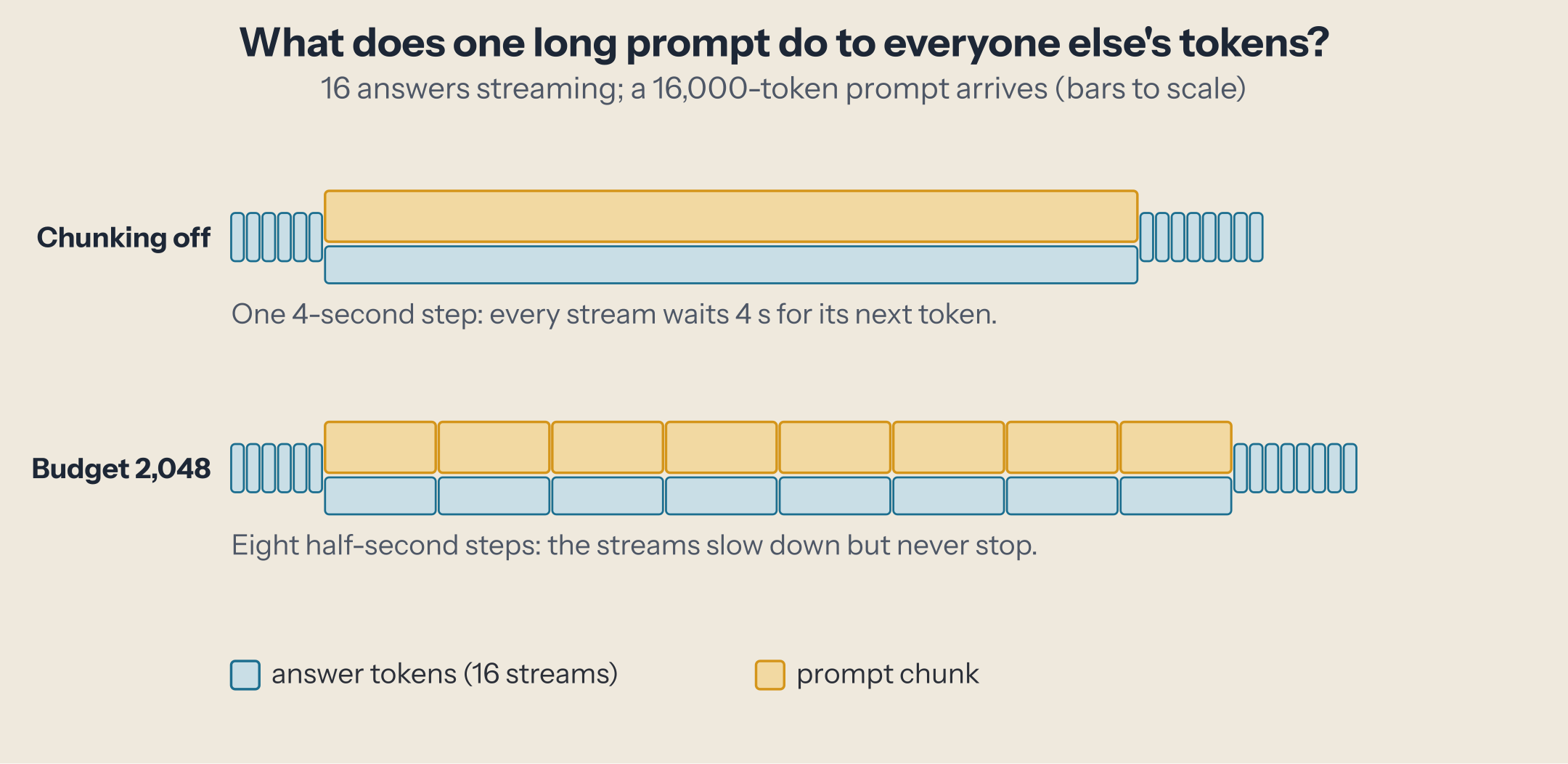
A step lasts as long as its slowest part. Decoding 16 requests on Qwen3-8B takes about 76 ms per step on our test machine (an NVIDIA GB10, DGX Spark class): that is the pace of every answer, 13 tokens per second each. Reading a prompt is different. Its tokens are processed all at once, and that work is limited by computation, not by memory: about 4,000 tokens per second here. A 16,000-token prompt read in one step makes that step last four seconds.
Every streaming answer is in that step too. Its next token comes out when the step ends. So for four seconds, 16 people see their answer stop.
Chunked prefill: split the prompt, keep the answers flowing
The fix is to never let one step grow too large. The engine gives each step a token budget. Decoding requests take their one token each first; whatever budget is left goes to a chunk of the waiting prompt. A 16,000-token prompt under a 2,048-token budget is read in 8 chunks over 8 steps, and every one of those steps also produces a token for every streaming answer.
The idea comes from the Sarathi-Serve paper (2024), which called it "chunked-prefills" with "stall-free" schedules that add new requests "without pausing ongoing decodes". Today it is the default in vLLM and SGLang.
The budget is a trade-off, and you can see it move:
Three things to try:
- Start at 8,192 (vLLM's default here), then pick 512. The streams' longest wait drops from about 2 seconds to under 200 ms. The prompt's first token comes about a second later: 33 small steps cost more than 2 big ones, because every step reads all the weights once and has a fixed overhead.
- Pick "chunking off". One four-second step. The prompt's first token is the fastest possible, and every stream waits for it.
- Switch to "prompt alone". Same budget, but now the steps that carry a prompt chunk carry nothing else. The streams wait through every chunk, back to back. That is SGLang's default, and the next sections show what it does under real load.
The widget is a cost model, not a recording: each step costs the larger of the weight read and the work on its tokens, plus a fixed overhead for steps that carry a prompt chunk. Its constants come from the measurement below, and it reproduces the measured first-token times of a lone prompt within about 10%.
Inside vLLM: one budget per step
vLLM's scheduler (version 0.31.0) gives each step one budget, max_num_batched_tokens (source). It serves the requests already running first (L628): a decoding request takes one token, a request whose prompt is half-read takes as much of the budget as it can. Then it admits waiting requests with what is left (L872). Chunked prefill is on by default.
Three details matter in practice:
- The default budget depends on your GPU. Under
vllm serve, it is 16,384 tokens on GPUs with 160 GB or more, 8,192 from 70 GB, and 2,048 below that (source). The startup log prints it:Chunked prefill is enabled with max_num_batched_tokens=8192. - Turning chunking off has a condition. With
--no-enable-chunked-prefill, a prompt that does not fit in the step's remaining budget waits for a later step (L1115), so the budget must be at least as large as your longest prompt. - Several long prompts can share the budget.
--long-prefill-token-thresholdcaps how much of a step one prompt may take, so two long prompts progress side by side instead of one after the other. It is ignored when only one request is waiting or running (L611), and 0.31.0 adds--long-prefill-token-threshold-adaptive, which never lets the cap fall below a fair share of the budget.
Inside SGLang: prompts get their own steps, unless you mix
SGLang chooses differently. When a prompt chunk is waiting, its scheduler runs a step with that chunk alone ("Run prefill first if possible", source); the answers decode only in steps where no prompt is waiting. The chunk size, --chunked-prefill-size, is set per GPU at startup: 8,192 tokens on our machine.
--enable-mixed-chunk, off by default, changes that: the running requests are merged into the prompt's step (source), as vLLM does. The difference shows up when prompts keep arriving.
Measured: who waits, and for how long
We ran both engines on an NVIDIA GB10 (DGX Spark class) on 2026-10-05: vLLM 0.31.0 and SGLang 0.5.21, Qwen3-8B in BF16, a 32,768-token context. Two clients ran at once, both with vLLM's benchmark tool:
- Streams: 16 requests in flight, each a 256-token prompt and a 1,024-token answer, 48 in total.
- Long prompts: eight prompts of 16,000 tokens (32-token answers), one every 4 seconds, starting 20 seconds in.
$ vllm serve Qwen/Qwen3-8B --gpu-memory-utilization 0.85 --max-model-len 32768 \
    --max-num-batched-tokens 2048
$ vllm bench serve --backend openai --endpoint /v1/completions --model Qwen/Qwen3-8B \
    --dataset-name random --random-input-len 16000 --random-output-len 32 \
    --random-range-ratio 0 --ignore-eos --num-prompts 8 --request-rate 0.25
We changed one setting at a time and recorded, for the streams, the longest gap between two tokens while the long prompts were in flight, and for the long prompts, the time to the first token of the fastest one, which never queued behind another. Every request completed in every run.
| Configuration | Streams: longest wait | Streams: mean gap during the long prompts | Long prompt: first token, alone |
|---|---|---|---|
| No long prompts (baseline) | 0.08 s (p99) | 0.076 s | n/a |
| vLLM, budget 512 | 0.22 s | 0.16 s | 5.2 s |
| vLLM, budget 2,048 | 0.70 s | 0.25 s | 4.4 s |
| vLLM, budget 8,192 (default) | 2.30 s | 0.29 s | 4.2 s |
| vLLM, budget 16,384 | 5.48 s | 0.40 s | 4.0 s |
| vLLM, chunking off | 7.64 s | 0.28 s | 4.0 s |
| SGLang, default (chunks of 8,192) | 11.92 s | 0.32 s | 4.1 s |
SGLang, --enable-mixed-chunk |
2.25 s | 0.27 s | 4.1 s |
| SGLang, chunking off | 7.75 s | 0.31 s | 4.0 s |
What the numbers say:
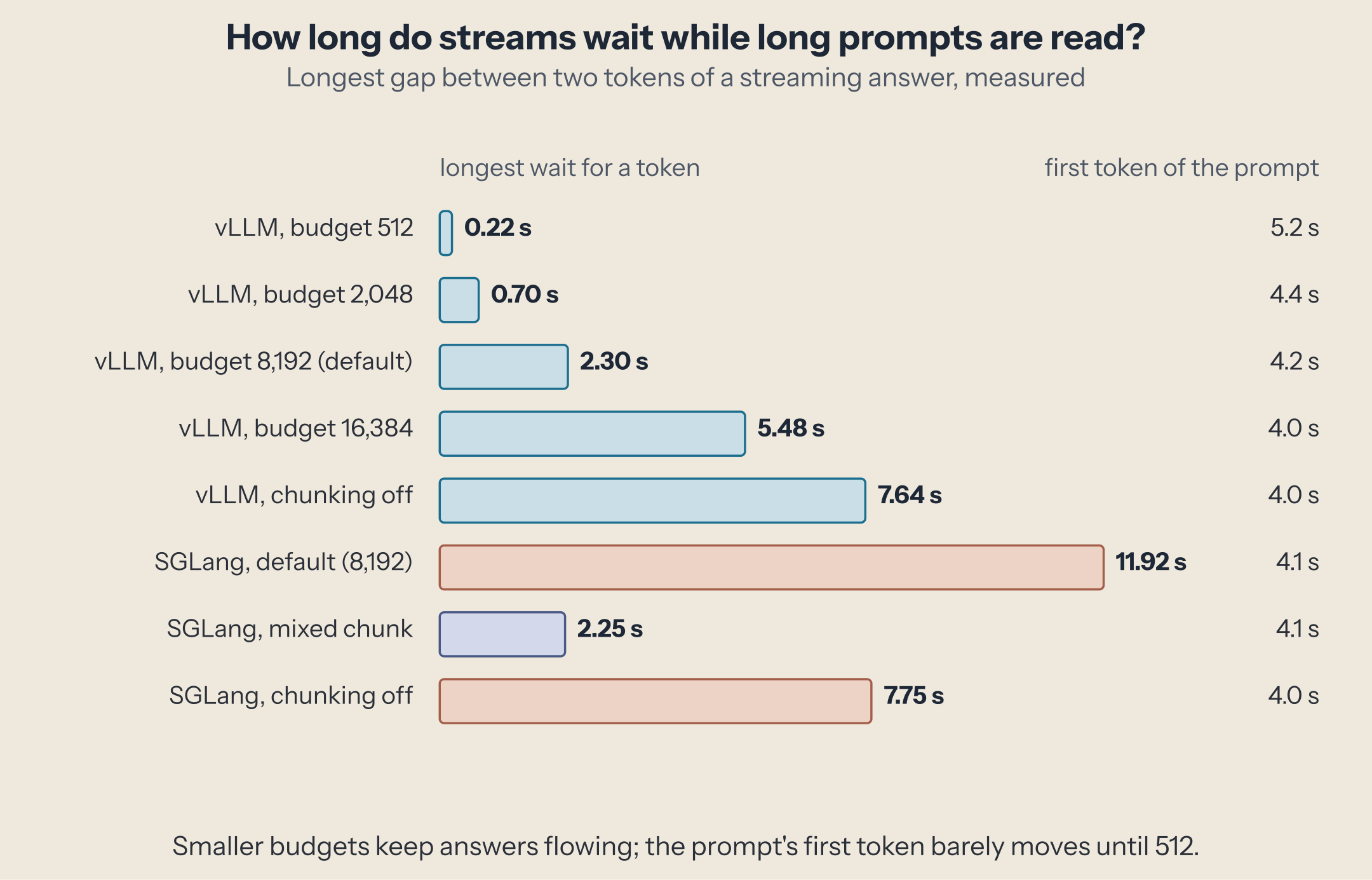
- The budget sets the longest stall. In vLLM, the streams' worst wait follows the budget almost in proportion: 0.22 s, 0.70 s, 2.3 s, 5.5 s. A step is as long as the prompt chunk it carries, at about 4,000 tokens per second.
- The prompt barely pays, until the budget gets small. Its first token arrives in 4.0 s unchunked, 4.2 s at 8,192, 4.4 s at 2,048. Only at 512 does it rise to 5.2 s: with 33 steps, the fixed cost of each step adds up.
- Without chunking, two prompts can land in one step. The worst stall with chunking off (7.6 s) is about two prompts long, not one: prompts arrived every 4 seconds and each took 4 seconds to read, so one big step sometimes carried two.
- Prompt-only steps are the worst case under load. SGLang's default stalled a stream for 11.9 s, longer than with chunking off: while prompts kept arriving, it ran their chunks back to back and the answers waited through all of them. With
--enable-mixed-chunk, SGLang behaves like vLLM at the same budget (2.25 s against 2.30 s). - Total throughput hardly moves. The streams produced 179 to 187 tokens per second in every configuration with long prompts (208 without them): the budget decides who waits, not how much work gets done.
Choosing the budget
There is no universally right budget: it depends on what your users feel.
- Chat and voice, where streaming smoothness matters: a smaller budget, 2,048 or below on a GPU like this one, keeps every answer moving. Pick it from your target: the worst stall is roughly the budget divided by your GPU's prompt-reading speed (here, 2,048 tokens at about 4,000 per second is half a second).
- Batch jobs and agents that wait for whole answers: a larger budget, or the default. Nobody watches tokens arrive, and long prompts finish slightly sooner.
- SGLang serving interactive users: add
--enable-mixed-chunk, and set--chunked-prefill-sizethe same way you would set vLLM's budget. - Many long prompts at once: in vLLM,
--long-prefill-token-threshold(with the new adaptive option) lets them share each step instead of queuing whole.
The faster your GPU reads prompts, the larger the budget you can afford for the same stall: an H200 or B200 reads prompts several times faster than this machine, which is why vLLM gives large GPUs larger defaults. Measure your own: run your traffic, read the p99 time between tokens and the time to first token, and move the budget until the stall is one your users won't notice.
Next
Chunked prefill decides how prompts share a step with answers. The next piece looks at a different kind of constraint on each step: forcing the answer itself to follow a format, with structured output.
This post is part of the How an LLM Request Becomes Tokens collection (7 of 10)

Inference engineering and AI in production — depth-first, no hype.
Inference Notes
Once a week: what changed in serving AI models, and what it means if you build, run or pay for them, in about five minutes.
Related Articles
Prefill vs. Decode: Why the Second Token Is a Different Workload
Why a prompt token costs hundreds of times less than an answer token on the same weights: prefill and decode, seen in a kernel trace.
From Prompt to Token: The Life of an LLM Request
One chat request followed through a real inference server, from chat template and tokens to prefill, decode, sampling, and streaming, each stage timed.
Expert Parallelism, and What DeepEP Does for It
Why serving a big MoE model means spreading its experts over many GPUs, what dispatch and combine cost, and how DeepEP and its V2 redesign make it fast.