The KV Cache, Sized: What the Formula Says and What Your Engine Gives You
Every token a model has read stays in GPU memory as keys and values until the request ends. That memory, not the weights, decides how many requests you can serve at once, and you can compute it from the model's config.json before you launch anything.
What one token costs
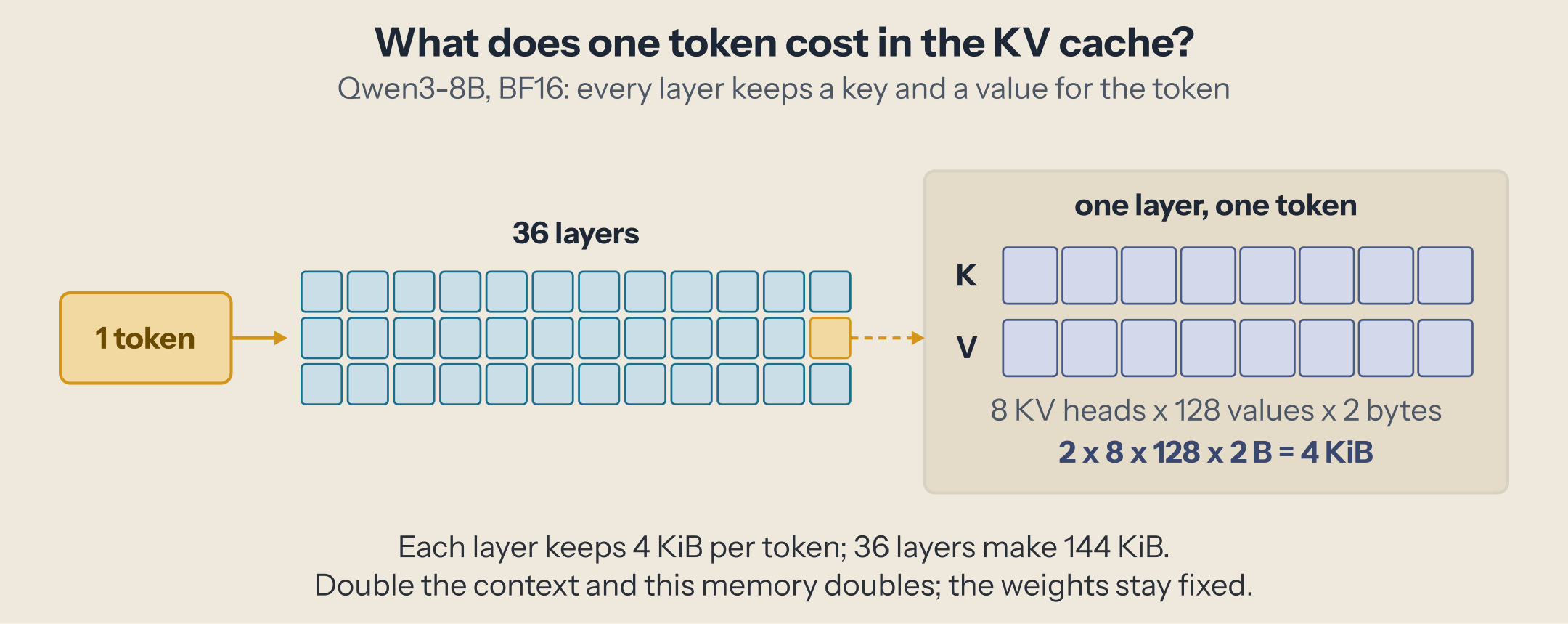
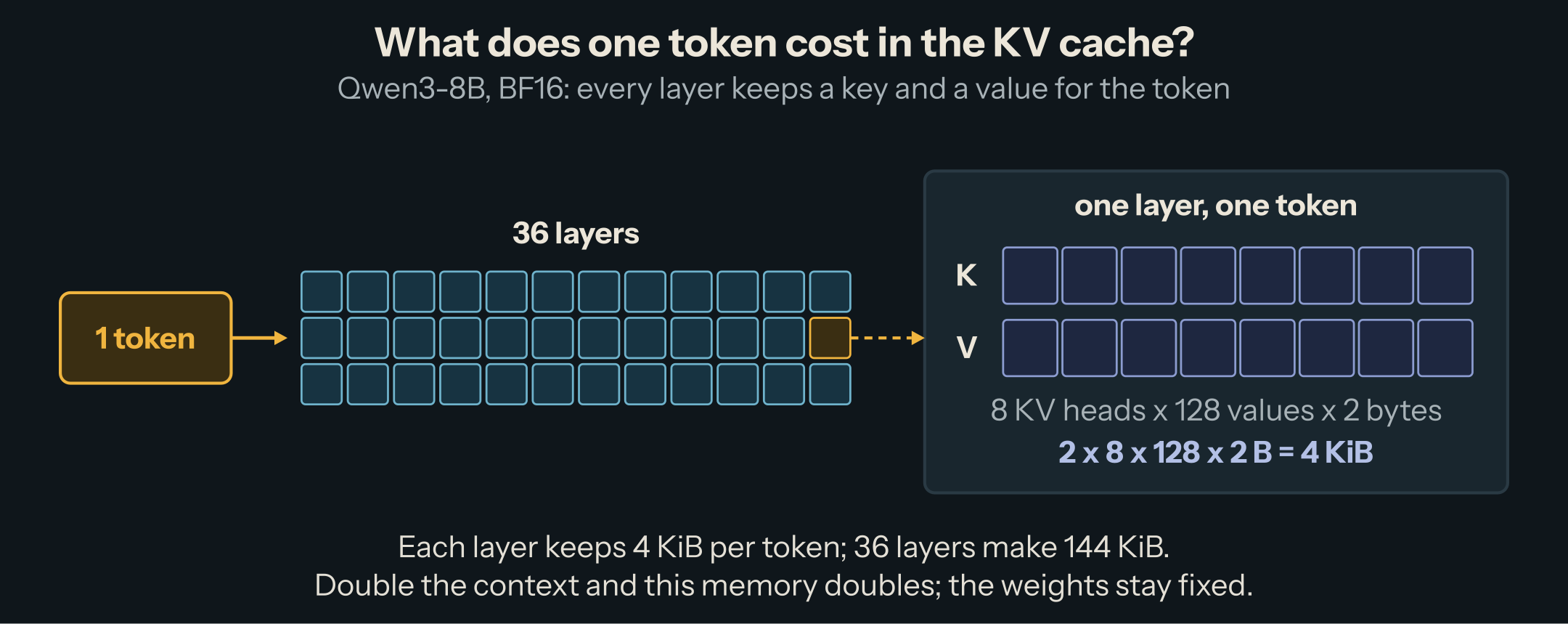
The KV cache stores, for each token and each layer, the key and the value that attention computed for it, so later tokens can reuse them without recomputing. One token costs:
bytes per token = 2 × layers × KV heads × head_dim × bytes per value
The 2 is one key plus one value. The other factors come from the model's config.json:
| Factor | Config field | Qwen3-8B |
|---|---|---|
| Layers | num_hidden_layers |
36 |
| KV heads | num_key_value_heads |
8 |
| Head dimension | head_dim |
128 |
| Bytes per value | from the dtype (BF16 = 2) | 2 |
For Qwen3-8B that is 2 × 36 × 8 × 128 × 2 = 147,456 bytes, or 144 KiB per token. A 32,768-token request holds 4.5 GiB of cache. The weights take about 15 GiB in BF16, so four long requests already cost more memory than the model itself.
Two details change the result by a factor of two or more.
Use KV heads, not attention heads. Qwen3-8B has 32 attention heads but only 8 KV heads: with grouped-query attention (GQA), four query heads share one key and value head. Using 32 gives a cache four times too large.
Read head_dim from the config. A common shortcut derives it as hidden_size / num_attention_heads. For Qwen3-30B-A3B that gives 2048 / 32 = 64, while the config says head_dim: 128. The shortcut is off by half.
Try it
Pick a model and move the controls. The bar shows where the GPU's memory goes; the numbers below show what is left for the cache. It starts at 121.63 GiB, the memory of the machine measured below.
Three things to try:
- Change the context from 40,960 to 8,192 tokens. The cost per request drops by five and the number of concurrent requests rises by five. The weights don't move.
- Switch the KV cache dtype to FP8. The cache halves, and the concurrency doubles, without touching the weights.
- Pick gpt-oss-120b with 4-bit weights. Its per-token cost is a quarter of Qwen3-8B's, for a model fourteen times larger. The reason is in the last section.
The "runtime reserve" field is the calculator's one estimate: the memory the engine needs for itself. The rest of this piece says what it stands for and how to replace it with the real number for your setup.
What the engine actually gives you
vLLM decides the size of the KV cache once, at startup, in three steps.
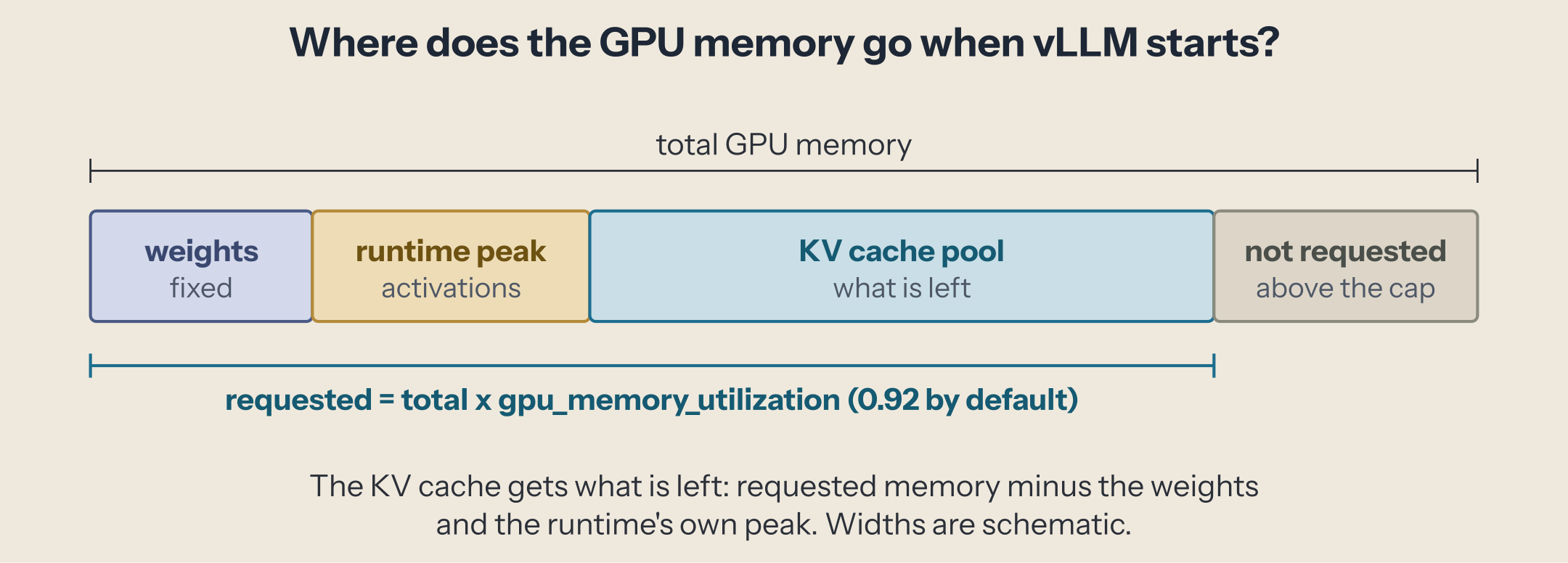
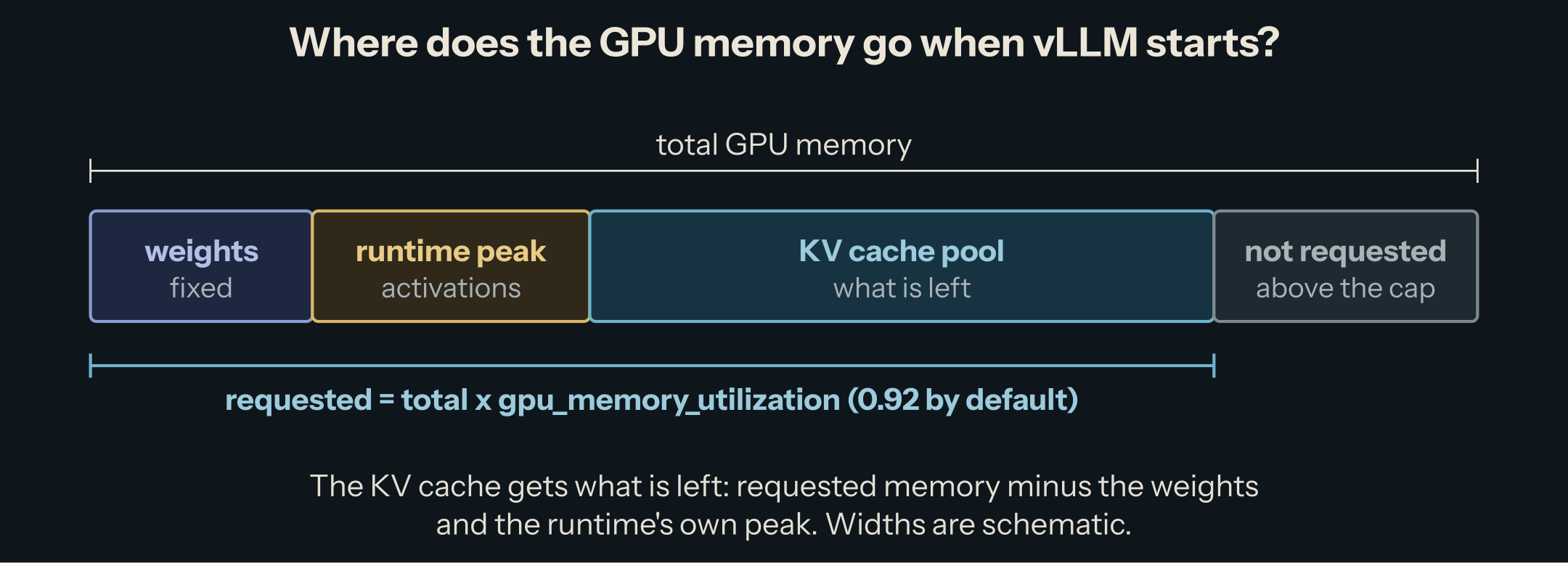
1. It requests a share of the GPU. requested = total memory × gpu_memory_utilization, and the default is 0.92. The rest is never used. The share covers the whole engine, weights included, not only the cache.
2. It measures what the model needs. vLLM loads the weights, runs one dummy forward pass, and records the peak. What is left of the requested memory becomes the KV cache pool:
KV cache pool = requested − (weights + peak of a forward pass + other runtime memory)
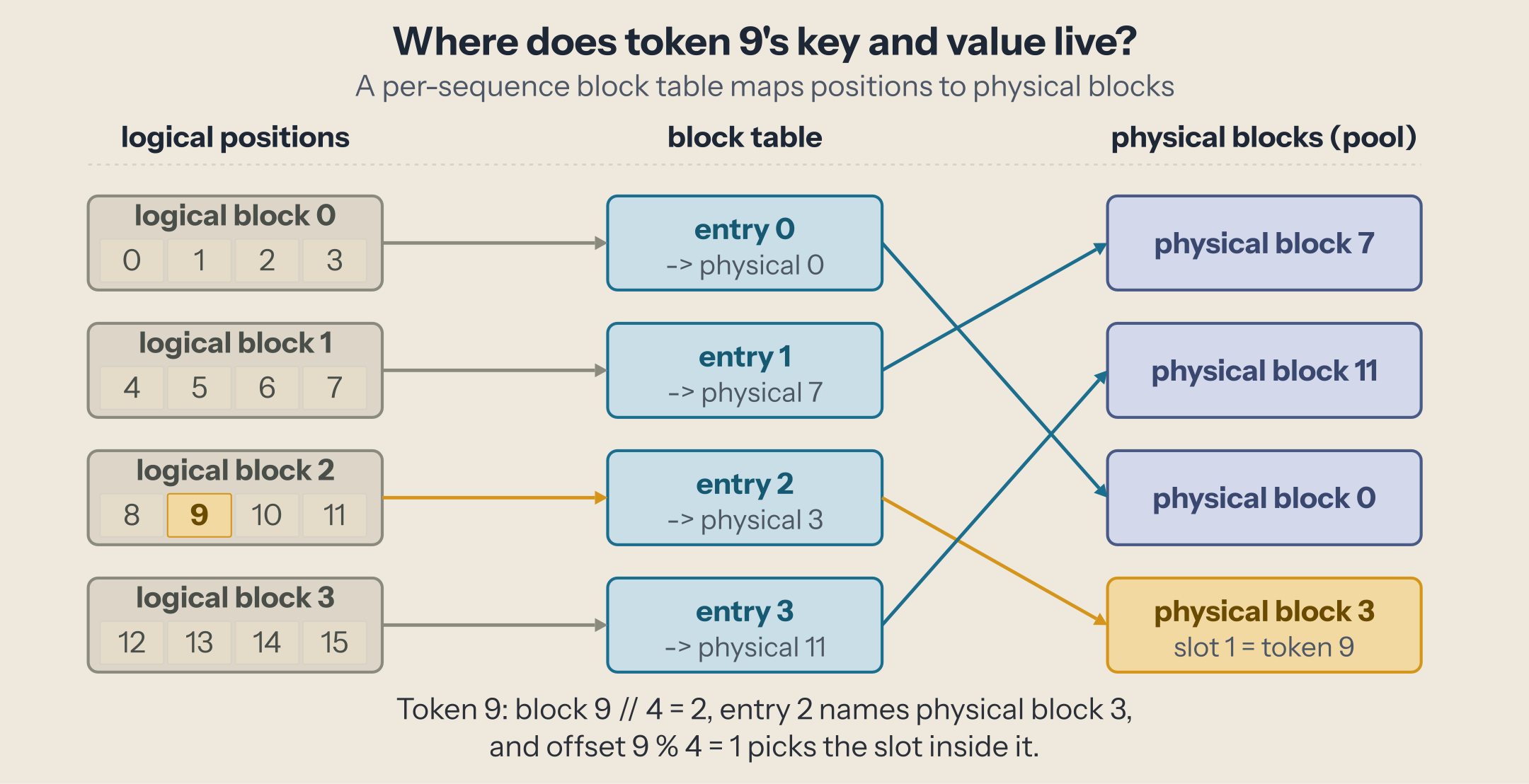
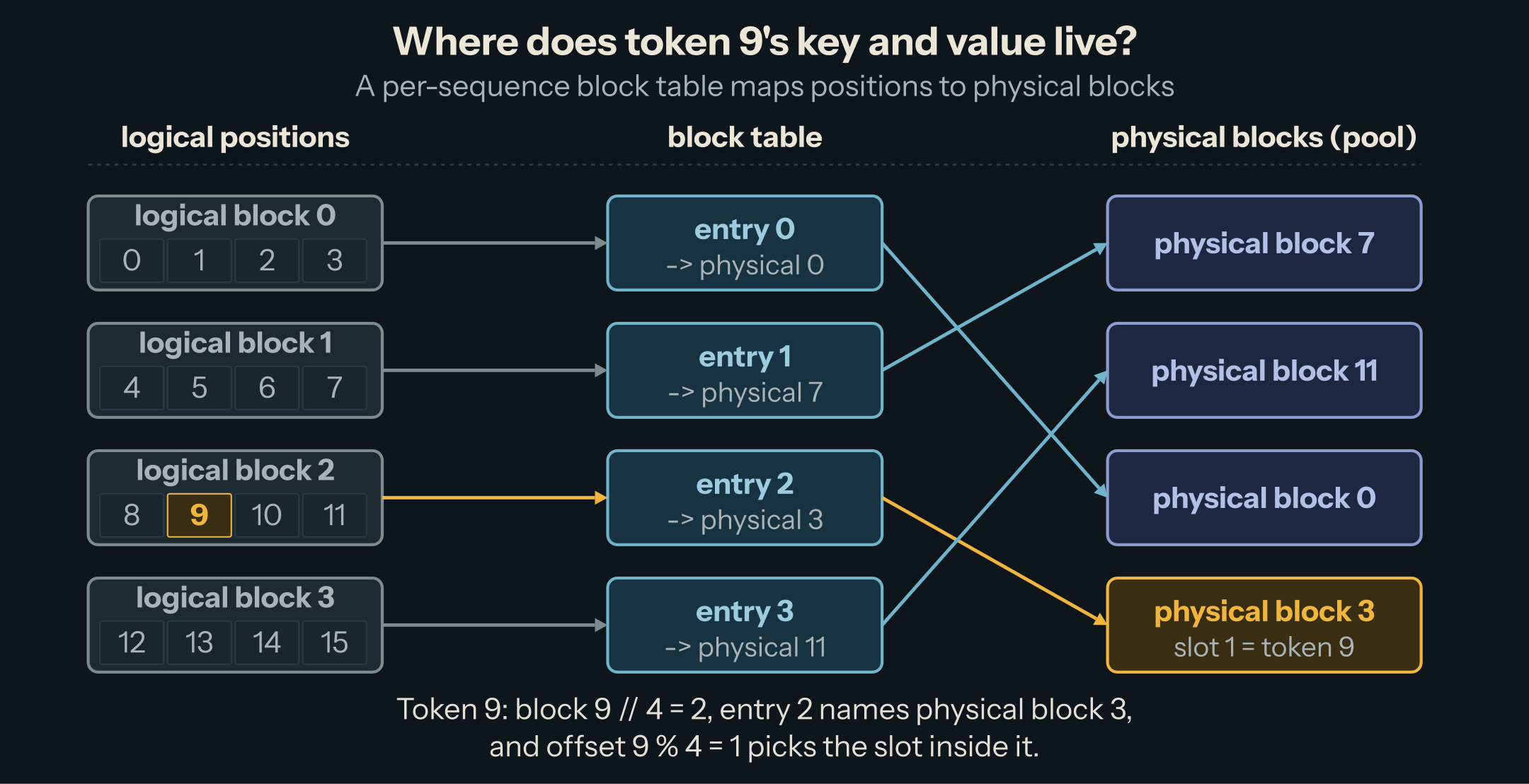
3. It cuts the pool into blocks. A block holds 16 tokens for every layer. Requests take blocks as they grow and give them back when they finish, which is what lets short and long requests share one pool without wasting memory. The figure uses blocks of 4 tokens to stay readable.
We ran it
Setup: vLLM 0.28.0, Qwen/Qwen3-8B in BF16, default settings, on an NVIDIA GB10 (DGX Spark class, 121.63 GiB of unified memory), 2026-10-02.
$ vllm serve Qwen/Qwen3-8B --port 8001
With VLLM_LOGGING_LEVEL=DEBUG, the startup log shows each step (trimmed):
Model loading took 15.27 GiB memory and 87.945735 seconds
Initial free memory: 113.91 GiB; Requested memory: 0.920000 (util), 111.9 GiB
Memory profiling takes 17.93 seconds. Total non KV cache memory: 18.29GiB; torch peak memory increase: 1.19GiB; total consumed (from mem_get_info): 17.13GiB; weights memory: 15.27GiB.
Available KV cache memory: 93.61 GiB
GPU KV cache size: 681,600 tokens, Maximum concurrency for 40,960 tokens per request: 16.64x
Every number follows from the ones before it:
| Step | Computation | Result |
|---|---|---|
| Requested | 121.63 GiB × 0.92 | 111.9 GiB |
| Not cache | 15.27 GiB of weights + 3.02 GiB for the runtime | 18.29 GiB |
| KV cache pool | 111.9 − 18.29 | 93.61 GiB |
| Tokens | 93.61 GiB ÷ 144 KiB | 681,600 |
| Concurrency | 681,600 ÷ 40,960 | 16.64 |
The formula from the first section predicts the token count exactly. The only number you can't know before launching is the runtime's 3.02 GiB: the peak of a forward pass plus memory allocated outside PyTorch. The calculator starts with 3 GiB for that reason. For another model or engine version, launch once, read Total non KV cache memory, subtract the weights, and put the result in the reserve field.
The last log line is the one to remember. 40,960 is --max-model-len, the longest request the server accepts, and 16.64x is how many requests of that length fit at once. Two more launches show how it moves:
| Launch | KV cache size | Maximum concurrency |
|---|---|---|
| Defaults | 681,600 tokens | 16.64 × 40,960 tokens |
--max-model-len 8192 |
680,976 tokens | 83.13 × 8,192 tokens |
--kv-cache-dtype fp8 |
1,362,192 tokens | 33.26 × 40,960 tokens (see Gotchas) |
A shorter maximum doesn't add memory; it divides the same pool into more requests. FP8 doubles the tokens, as the formula says.
If you would rather give the cache a fixed size, --kv-cache-memory-bytes sets it directly and ignores the utilization setting.
Where the simple formula breaks
The formula assumes every layer keeps a full key and value for every token. Three designs break that assumption, all in your favor.
Sliding-window layers. In gpt-oss, half the layers only attend to the last 128 tokens (sliding_window: 128 in the config). Their cache can stop growing after 128 tokens. Only the other half has to grow with the context: 36 KiB per token for gpt-oss-120b, not 72. We computed this from the config; we did not measure it.
Latent attention (MLA). DeepSeek-V3 doesn't cache per-head keys and values. It caches one compressed vector per layer (kv_lora_rank: 512, plus 64 for the position part) and rebuilds the rest. Its 61 layers cost about 69 KiB per token, less than half of Qwen3-8B, for a model with 128 attention heads.
Quantized cache. --kv-cache-dtype fp8 stores each value in one byte, so the same pool holds twice the tokens. It is a lossy format: check your quality metric before relying on it.
One thing makes real capacity higher than any of these numbers: prefix sharing. Requests that start with the same tokens (a shared system prompt) can point at the same blocks, so those tokens are paid for once.
Gotchas
"Maximum concurrency" is the worst case. It assumes every request uses the full --max-model-len. If your traffic averages 4,000 tokens on a 32,768 limit, you will serve about eight times more requests than the log says. Lowering --max-model-len also lowers the minimum the server needs to start: vLLM refuses to launch if the pool can't hold a single request of maximum length.
The utilization setting is not the cache size. Raising --gpu-memory-utilization from 0.92 to 0.95 adds 3% of the whole GPU to the cache, which on an 80 GiB card is 2.4 GiB: about 17,000 more tokens for Qwen3-8B. Don't push it to 1.0; the engine needs room for memory it didn't measure at startup.
Check that the FP8 cache actually starts. Our first FP8 launch (vLLM 0.28.0) printed the doubled capacity and then stopped with RuntimeError: FlashInfer backend is not available, although FlashInfer was installed. The message is misleading: vLLM treats FlashInfer as unavailable unless its prebuilt kernels (flashinfer-cubin) are installed or the CUDA compiler nvcc is on the PATH, to compile them. With /usr/local/cuda/bin on the PATH, the same launch served requests with the FP8 cache. The capacity line is printed before this check, so read the log to the end before trusting the number.
On unified memory, the system counts. Our test machine, an NVIDIA GB10, shares its 121.63 GiB between CPU and GPU. With no model loaded, only 113.91 GiB was free: the operating system and other processes held the rest. vLLM requests a share of the total (111.9 GiB), which left a 2 GiB margin. A browser or a second service on that machine is enough to make the launch fail. It works the other way too: when other services start while the server runs, free memory can fall low enough for the operating system's out-of-memory guard to kill the server. On a shared machine, leave headroom: we run with --gpu-memory-utilization 0.85.
Other processes on the GPU count. vLLM refuses to start if the free memory is below what it requests. A second engine or a notebook holding a few GiB is enough to trip it at the default 0.92.
Next
The pool is fixed at startup; what changes every few milliseconds is who gets its blocks. That is the scheduler's job, and the subject of continuous batching.
This post is part of the How an LLM Request Becomes Tokens collection (3 of 10)

Inference engineering and AI in production — depth-first, no hype.
Inference Notes
Once a week: what changed in serving AI models, and what it means if you build, run or pay for them, in about five minutes.
Related Articles
Prefill vs. Decode: Why the Second Token Is a Different Workload
Why a prompt token costs hundreds of times less than an answer token on the same weights: prefill and decode, seen in a kernel trace.
From Prompt to Token: The Life of an LLM Request
One chat request followed through a real inference server, from chat template and tokens to prefill, decode, sampling, and streaming, each stage timed.
A GPU in One Picture: SMs, Warps, and Memory
The parts of a GPU that decide inference speed, from streaming multiprocessors to DRAM, with one real GPU's numbers and three measurements.