A GPU in One Picture: SMs, Warps, and Memory
To write one word of an answer, an 8-billion-parameter model reads 15 GB of weights, every layer of it; on our GPU that takes 72 milliseconds, and almost none of it is arithmetic (prefill vs. decode). Sentences like "decode is memory-bound" only make sense once you can picture where those 15 GB sit, where the arithmetic happens, and what connects them. This piece draws that picture for one real GPU, an NVIDIA GB10, with its own numbers, and measures the three properties that set the speed of inference: how fast it reads, how fast it multiplies, and how much it costs to start a kernel.
The chip: many identical SMs
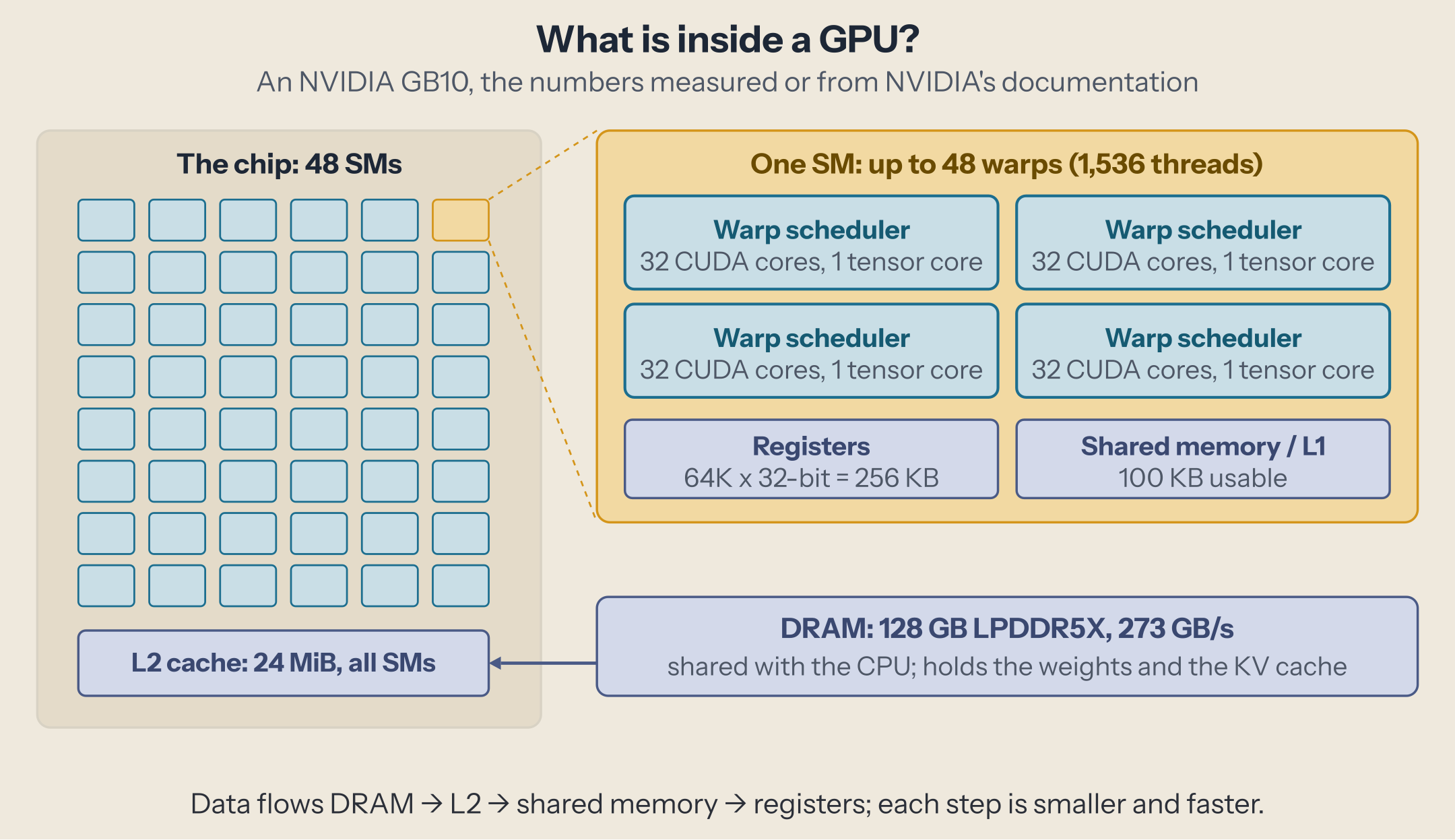
A GPU is built from streaming multiprocessors (SMs), identical units that each run their own share of the work. The GB10 has 48 of them; a data center H100 or H200 (SXM) has 132. Everything a kernel does, a matrix product or an attention step, is cut into blocks of threads, and the hardware spreads those blocks across the SMs. More SMs, more blocks at once.
The SMs share one L2 cache, 24 MiB on the GB10, and behind it DRAM, the main memory that holds the weights and the KV cache. On the GB10, DRAM is 128 GB of LPDDR5X that the CPU and GPU share, rated at 273 GB/s. A data center GPU uses stacked HBM instead: the H200 reads 4.8 TB/s, about 18 times more.
Inside an SM: warps and two kinds of cores
Threads run in groups of 32 called warps: the 32 threads of a warp execute the same instruction at the same time, each on its own data. An SM can hold up to 48 warps (1,536 threads) at once, and its four warp schedulers pick, every cycle, a warp that is ready to run. That is how a GPU hides the wait for memory: while one warp waits for data, another computes. It only works if there are enough warps, which is one reason a kernel with too little work leaves the GPU idle.
Each of the SM's four partitions has 32 CUDA cores, each doing one FP32 multiply-add per cycle, and one tensor core, which multiplies a small matrix tile with one instruction. Matrix products, almost all of an LLM's arithmetic, go to the tensor cores.
The fastest storage is in the SM itself: 64K 32-bit registers (256 KB), private to each thread, and 100 KB of shared memory, which the threads of a block use to share tiles of data they loaded once from DRAM. A well-written matrix kernel loads a tile into shared memory, then reuses each loaded value many times from there; that reuse is what lets it outrun memory.
Data flows from DRAM to L2 to shared memory to registers, and each step is smaller and faster than the last.
Measurement 1: how fast it reads
The simplest test of the memory: sum a tensor, over and over, and divide its size by the time. Small tensors stay in the L2 cache between repetitions; large ones must come from DRAM every time. In PyTorch, its core is three lines (the full script is at the end):
x = torch.ones(size // 2, dtype=torch.bfloat16, device="cuda")
t = timeit(lambda: x.sum(), iters=iters)      # seconds per call, from CUDA events
gbps = size / t / 1e9
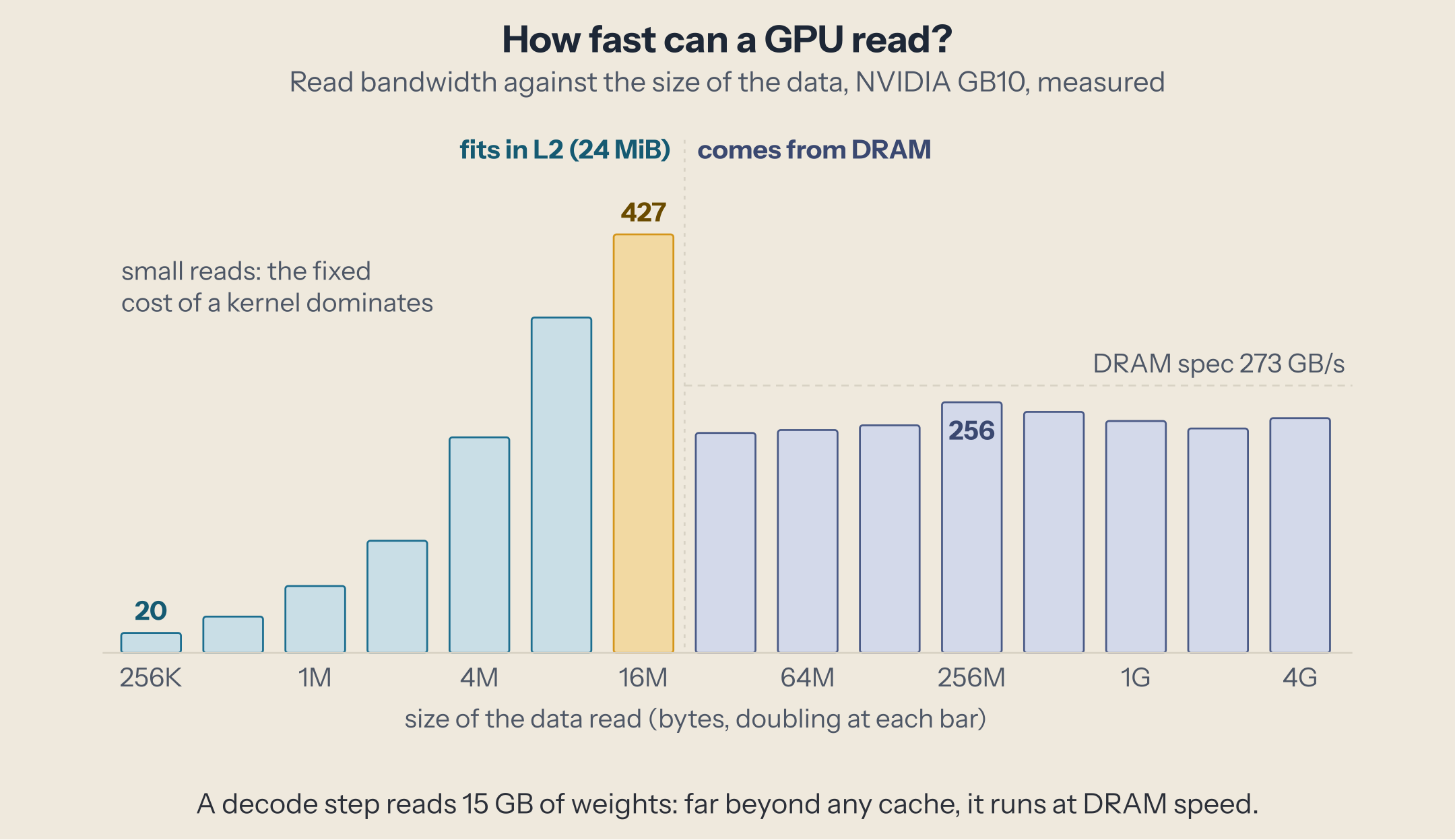
Three regions. Below a few MiB, each sum is too short to measure the memory: a 256 KiB read takes 13 µs, mostly the fixed cost of starting a kernel and finishing a reduction. At 16 MiB, the data is in the L2 cache and reads at 427 GB/s, the fastest point. From 32 MiB on, the data no longer fits, and the bandwidth drops to 225-256 GB/s, the speed of DRAM: 82 to 94% of the 273 GB/s on the data sheet, which is the raw rate of the memory chips, never reached by a kernel.
The decode step's 15 GB sit far to the right of this chart, 600 times larger than the L2 cache. Every step reads them at DRAM speed, and 15.1 GB at about 210 GB/s is the 72 ms we measured. That is what "memory-bound" means: the tensor cores wait for data.
Measurement 2: tensor cores against CUDA cores
The same 8192 × 8192 matrix product, three ways:
| Matrix product, 8192 × 8192 | Units | Measured |
|---|---|---|
| BF16 | tensor cores | 94.4 TFLOPS |
| FP32, TF32 off | CUDA cores | 18.6 TFLOPS |
| FP32, TF32 on | tensor cores, FP32 inputs rounded to TF32 | 31.6 TFLOPS |
The tensor cores are five times faster than the CUDA cores on the same product, which is why inference runs its matrix products in BF16 or narrower formats, and why each new tensor core generation adds a smaller format. Prefill uses this: reading a 2,048-token prompt, Qwen3-8B's matrix products ran at 85 TFLOPS, 90% of this peak. Prefill is limited by the tensor cores, decode by DRAM; the roofline piece turns that into one number per GPU.
Measurement 3: what a kernel launch costs
Every operation runs as a kernel, alone or fused with others, and starting one costs time on the CPU and on the GPU. We launched a kernel that adds 1 to one number, 10,000 times from PyTorch: 3.2 µs per launch, PyTorch's own overhead included. Then we recorded 1,000 of them in a CUDA graph, which the GPU replays without the CPU starting each one: 0.9 µs per kernel.
A decode step of Qwen3-8B runs 145 matrix kernels plus attention and smaller ones. At 3.2 µs each, 145 launches are 0.5 ms; against a 72 ms step, that hardly matters. On a fast GPU with a small model, where the whole step takes 2 ms, the same launches would be a quarter of it. That is why vLLM and SGLang capture decode steps in CUDA graphs by default.
Which part limits what
| Work | Limited by | On the GB10 |
|---|---|---|
| Decode, few requests | DRAM bandwidth | 15 GB per step at 210-256 GB/s |
| Prefill, long prompts | tensor cores | 85-94 TFLOPS in BF16 |
| Many small kernels | launch cost | 0.9-3.2 µs per kernel |
Most of what an inference engine does attacks the first row: batching many requests into one decode step reuses each weight read for all of them, and speculative decoding checks several tokens per read, both moving work toward the second row; quantization makes the bytes themselves fewer. The third row is why engines fuse kernels and use CUDA graphs.
The same picture on a data center GPU
Every part is there on an H100 or H200, scaled up: 132 SMs instead of 48, a 50 MB L2 cache, and HBM at 3.35 to 4.8 TB/s instead of LPDDR5X at 273 GB/s. The ratios change, not the picture: decode still waits on memory, prefill still runs on the tensor cores, and a step made of small kernels is still paid in launches.
Run it yourself
The read curve on any NVIDIA GPU with PyTorch:
import torch

def timeit(fn, iters):
    for _ in range(10):
        fn()
    s, e = torch.cuda.Event(enable_timing=True), torch.cuda.Event(enable_timing=True)
    s.record()
    for _ in range(iters):
        fn()
    e.record()
    torch.cuda.synchronize()
    return s.elapsed_time(e) / 1000 / iters

p = torch.cuda.get_device_properties(0)
print(p.name, p.multi_processor_count, "SMs, L2", p.L2_cache_size // 2**20, "MiB")
size = 256 * 1024
while size <= 4 * 1024**3:
    x = torch.ones(size // 2, dtype=torch.bfloat16, device="cuda")
    t = timeit(lambda: x.sum(), iters=max(20, min(2000, int(2e9 / size))))
    print(f"{size / 2**20:8.2f} MiB  {size / t / 1e9:6.1f} GB/s")
    del x
    size *= 2
It takes about a minute. Stop anything else using the GPU first, or the numbers measure the sharing, not the hardware. The first line prints your SM count and L2 size; the knee of your read curve should sit just past the L2 size, and the plateau after it is the bandwidth that bounds your decode steps.
This post is part of the The GPU for Inference Engineers collection (1 of 3)

Inference engineering and AI in production — depth-first, no hype.
Inference Notes
Once a week: what changed in serving AI models, and what it means if you build, run or pay for them, in about five minutes.
Related Articles
DeepGEMM: The Matrix Multiplications Behind DeepSeek's Models
What DeepGEMM computes for DeepSeek's models: block-scaled FP8 and FP4 matrix multiplications, grouped GEMMs for MoE experts, and the fused Mega MoE kernel.
Your First CUDA Kernel, Compiled and Profiled
Write SAXPY in CUDA, compile it for a Blackwell GPU, check it, time it, and read what Nsight Systems and Nsight Compute say about it.
Prefill vs. Decode: Why the Second Token Is a Different Workload
Why a prompt token costs hundreds of times less than an answer token on the same weights: prefill and decode, seen in a kernel trace.