Your First CUDA Kernel, Compiled and Profiled
The kernels that run a language model are mostly large matrix products and attention, but they are built from the same pieces as the smallest kernel you can write: threads, blocks, a grid, and memory reads and writes. This tutorial writes that smallest useful kernel, SAXPY (y = a·x + y), compiles it with CUDA 13.4 for a Blackwell GPU, checks its result, times it, and reads it through the two NVIDIA profilers. Along the way it measures the one property that also limits an LLM's decode step: how fast the GPU can move bytes. You need to know C or C++; a GPU in one picture explains the hardware words used here.
The kernel
__global__ void saxpy(int n, float a, const float* x, float* y) {
  int i = blockIdx.x * blockDim.x + threadIdx.x;
  if (i < n) y[i] = a * x[i] + y[i];
}
__global__ marks a function that runs on the GPU and is called from the CPU. It is written for one thread: the GPU starts as many threads as you ask for, and each computes its own index i from three built-in variables. Threads come in blocks of blockDim.x threads; blockIdx.x is the block's number in the grid, and threadIdx.x the thread's number in its block. Block 3 of 256-thread blocks holds threads 768 to 1,023. The if covers the last block, whose threads may run past the end of the arrays.
The program around it
A CUDA program has the same five steps whatever the kernel: allocate GPU memory, copy the inputs there, launch the kernel, copy the result back, check it. Here is the complete file; it also times the copies and the kernel with CUDA events, timestamps recorded by the GPU itself:
// saxpy.cu: y = a * x + y on the GPU, checked against the CPU, timed with CUDA events.
// nvcc -O3 -arch=sm_121 saxpy.cu -o saxpy && ./saxpy [block_size]
#include <cstdio>
#include <cstdlib>
#include <cmath>
#include <vector>
#include <cuda_runtime.h>
#define CHECK(call) \
do { \
cudaError_t err_ = (call); \
if (err_ != cudaSuccess) { \
std::fprintf(stderr, "%s:%d: %s\n", __FILE__, __LINE__, \
cudaGetErrorString(err_)); \
std::exit(1); \
} \
} while (0)
// One thread per element: thread i computes y[i].
__global__ void saxpy(int n, float a, const float* x, float* y) {
int i = blockIdx.x * blockDim.x + threadIdx.x;
if (i < n) y[i] = a * x[i] + y[i];
}
int main(int argc, char** argv) {
const int n = 1 << 28; // 268,435,456 floats: 1 GiB per array
const int block = argc > 1 ? std::atoi(argv[1]) : 256;
const int grid = (n + block - 1) / block;
const float a = 2.0f;
const size_t bytes = size_t(n) * sizeof(float);
std::vector<float> hx(n), hy(n);
for (int i = 0; i < n; ++i) { hx[i] = float(i % 1000); hy[i] = 1.0f; }
float *dx, *dy;
CHECK(cudaMalloc(&dx, bytes));
CHECK(cudaMalloc(&dy, bytes));
cudaEvent_t start, stop;
CHECK(cudaEventCreate(&start));
CHECK(cudaEventCreate(&stop));
// Copy the inputs to GPU memory, timed.
CHECK(cudaEventRecord(start));
CHECK(cudaMemcpy(dx, hx.data(), bytes, cudaMemcpyHostToDevice));
CHECK(cudaMemcpy(dy, hy.data(), bytes, cudaMemcpyHostToDevice));
CHECK(cudaEventRecord(stop));
CHECK(cudaEventSynchronize(stop));
float copy_ms = 0;
CHECK(cudaEventElapsedTime(©_ms, start, stop));
// One run to check the result, from fresh inputs.
saxpy<<<grid, block>>>(n, a, dx, dy);
CHECK(cudaGetLastError());
CHECK(cudaMemcpy(hy.data(), dy, bytes, cudaMemcpyDeviceToHost));
int bad = 0;
for (int i = 0; i < n; ++i)
if (std::fabs(hy[i] - (a * float(i % 1000) + 1.0f)) > 1e-5f) ++bad;
// Then time 20 launches back to back.
const int reps = 20;
CHECK(cudaEventRecord(start));
for (int r = 0; r < reps; ++r) saxpy<<<grid, block>>>(n, a, dx, dy);
CHECK(cudaEventRecord(stop));
CHECK(cudaEventSynchronize(stop));
float ms = 0;
CHECK(cudaEventElapsedTime(&ms, start, stop));
ms /= reps;
// Each element reads x and y and writes y: 12 bytes.
const double gbps = 3.0 * bytes / (ms / 1e3) / 1e9;
std::printf("n=%d block=%d grid=%d errors=%d\n", n, block, grid, bad);
std::printf("copy to GPU: %.1f ms (%.1f GB/s)\n", copy_ms, 2.0 * bytes / (copy_ms / 1e3) / 1e9);
std::printf("kernel: %.3f ms, %.1f GB/s effective\n", ms, gbps);
CHECK(cudaFree(dx));
CHECK(cudaFree(dy));
return bad != 0;
}
Three things to notice. Every CUDA call returns an error code, and CHECK stops at the first failure with its file and line; a kernel launch returns nothing, so cudaGetLastError() checks that it launched; errors while it runs show up at the next call that waits for the GPU (here, the cudaMemcpy back). The launch syntax saxpy<<<grid, block>>> gives the number of blocks and threads per block; grid is rounded up so that grid × block covers all n elements. And launches are asynchronous: the CPU queues them and moves on, which is why the timing records an event on each side of 20 launches and waits for the second one.
Build and run
With the CUDA 13.4 toolkit installed (or inside NVIDIA's nvidia/cuda:13.4.3-devel-ubuntu24.04 container):
$ nvcc -O3 -arch=sm_121 saxpy.cu -o saxpy
$ ./saxpy
n=268435456 block=256 grid=1048576 errors=0
copy to GPU: 36.2 ms (59.3 GB/s)
kernel: 13.880 ms, 232.1 GB/s effective
-arch=sm_121 compiles for compute capability 12.1, the GB10. Use your GPU's: sm_120 for an RTX 50 or RTX PRO Blackwell card, sm_100 for a B200, or -arch=native to let nvcc ask the GPU in the machine. errors=0 means all 268 million results match the CPU's.
Is 232 GB/s good?
The kernel's job per element is 12 bytes of memory traffic (read x[i] and y[i], write y[i]) for 2 floating-point operations. Over 268 million elements, that is 3.2 GB per run, in 13.88 ms: an effective bandwidth of 232 GB/s. The GB10's memory is rated at 273 GB/s, and the best a plain read reached on it is 225-256 GB/s, so this kernel runs at 85-86% of the specification, as fast as the memory lets it. Nothing in the kernel can make it faster: its arithmetic takes a few percent of the time, and every byte is read exactly once.
That is the useful question for any memory-bound kernel: compute the bytes it must move, divide by its time, and compare with what the memory can do. If the answer is far below, the kernel has a problem; if it is close, only moving fewer bytes will help.
Does the block size matter?
The program takes the block size as an argument:
| Block size | Kernel time | Effective bandwidth |
|---|---|---|
| 32 | 13.68 ms | 235.5 GB/s |
| 64 | 13.95 ms | 230.9 GB/s |
| 128 | 13.86 ms | 232.5 GB/s |
| 256 | 13.88 ms | 232.1 GB/s |
| 512 | 13.75 ms | 234.2 GB/s |
| 1024 | 13.72 ms | 234.9 GB/s |
The spread is 2%, within run-to-run noise. With hundreds of thousands of blocks and nothing shared between threads, every block size keeps enough warps in flight to saturate memory. Block size starts to matter when threads share data through shared memory or hold many registers, which this kernel does not; 256 is a sensible default.
Nsight Systems: where the time goes
Nsight Systems records a timeline of everything the program asked of CUDA:
$ nsys profile -t cuda -o saxpy ./saxpy
$ nsys stats -r cuda_gpu_kern_sum,cuda_gpu_mem_time_sum,cuda_api_sum saxpy.nsys-rep
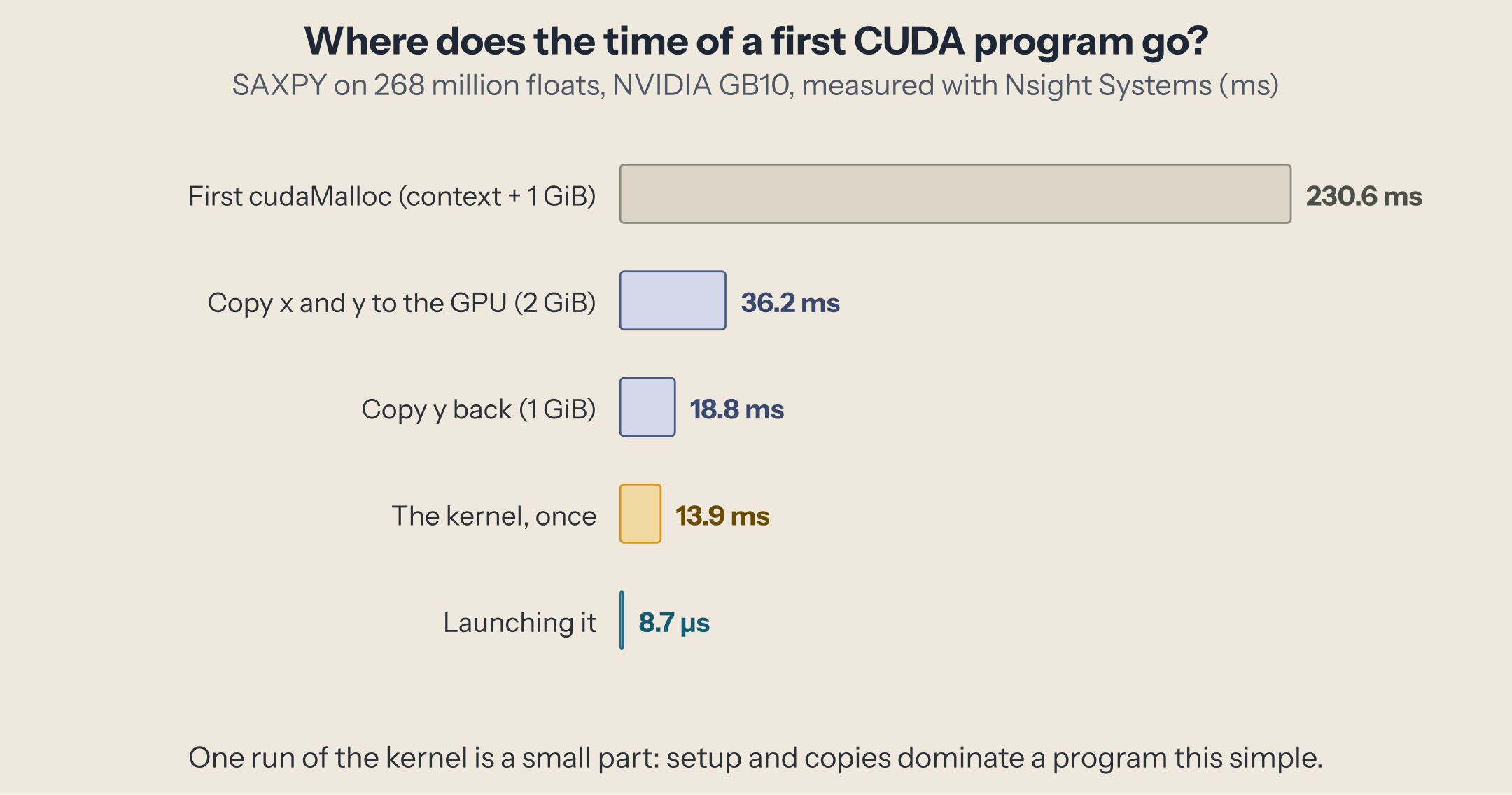
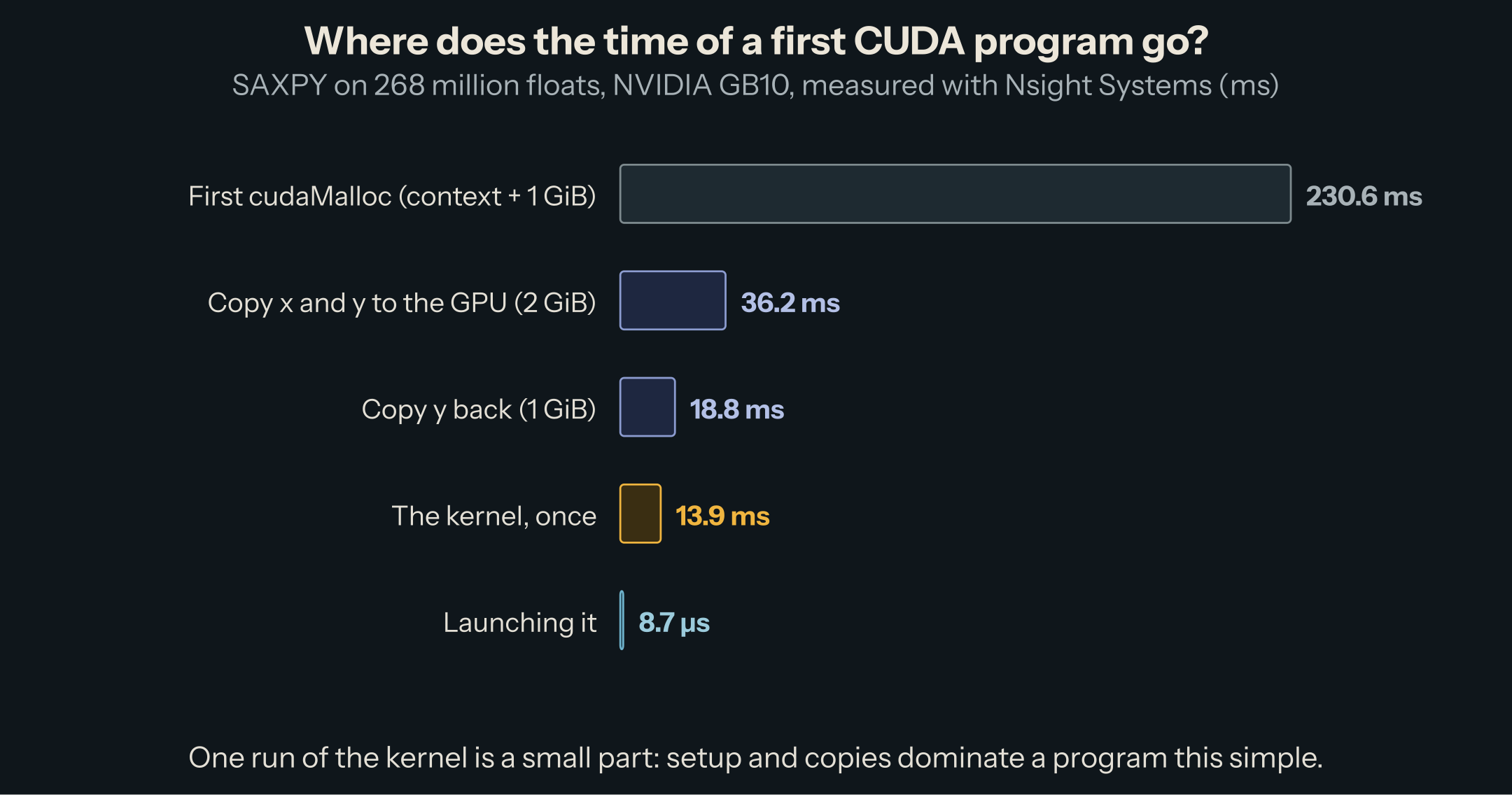
The kernel ran 21 times (the check, then 20 timed runs) at a median of 13.8 ms. Almost everything around it is bigger. The first CUDA call also creates the CUDA context: the first 1 GiB allocation took 231 ms, the second 44 ms, so roughly 185 ms is the context, paid once per process. Copying the two input arrays to the GPU took 36 ms and copying the result back 19 ms: 2.6 times one kernel run for the inputs alone. Launching the kernel cost 9 µs of CPU time on average.
On a GPU with its own memory, those copies cross the PCIe bus. On the GB10, CPU and GPU share the same memory, and cudaMemcpy still copies from one buffer to another, at 59 GB/s from ordinary (pageable) host memory. Either way, the lesson is the one inference engines are built around: load data to the GPU once and keep it there. A server copies a model's weights once at startup and then runs thousands of steps over them.
Nsight Compute: one kernel, in detail
Nsight Compute replays one kernel many times with hardware counters on:
$ ncu --kernel-name saxpy --launch-count 1 --section SpeedOfLight --section MemoryWorkloadAnalysis \
      --section Occupancy --section LaunchStats ./saxpy
The parts worth reading first:
    Section: GPU Speed Of Light Throughput
    SM Frequency                    Ghz         2.41
    Memory Throughput                 %        10.33
    Duration                         ms        14.03
    Compute (SM) Throughput           %         5.16
    Section: Launch Statistics
    Registers Per Thread             register/thread              16
    Waves Per SM                                             3640.89
    Section: Occupancy
    Theoretical Occupancy                     %          100
    Achieved Occupancy                        %        89.95
Occupancy is how many warps each SM holds against its maximum of 48. Sixteen registers per thread and no shared memory let every SM hold its maximum, and it averaged 90%. That is what lets the GPU hide memory latency: while some warps wait for data, others issue loads.
Speed of light compares the kernel's throughput with the hardware's peaks. Compute at 5% is expected: one multiply-add per 12 bytes. Memory at 10% is not what happened, since we measured 86% of the memory bandwidth ourselves. On the GB10, Nsight Compute reports no DRAM throughput (the line is missing from its output), so this percentage is computed without the memory that actually limits the kernel, and its advice ("below 60.0% of peak typically indicate latency issues") points the wrong way. Trust your own bytes-per-second arithmetic over a percentage whose reference you don't know; on a GPU with its own memory, check the DRAM throughput line, which shows the same thing directly.
What the compiler made of it
cuobjdump -sass shows the machine code the GPU runs. The kernel body, with the address computations left out, is a handful of instructions:
IMAD R7, R7, UR4, R0                       // i = blockIdx.x * blockDim.x + threadIdx.x
ISETP.GE.AND P0, PT, R7, UR5, PT           // i >= n ?
@P0 EXIT
LDG.E R2, desc[UR4][R2.64]                 // load x[i]
LDG.E R7, desc[UR4][R4.64]                 // load y[i]
FFMA R7, R2, UR6, R7                       // a * x[i] + y[i], one fused multiply-add
STG.E desc[UR4][R4.64], R7                 // store y[i]
EXIT
Two loads, one fused multiply-add, one store. Each thread spends almost all its life waiting for its two loads, which is why the kernel is limited by memory and why the number of threads in flight matters more than anything the arithmetic does.
What this has to do with inference
A decode step of a language model has the same shape as SAXPY: every weight is read once, used for one multiply-add per request, and never again during the step. That is why decode, like this kernel, runs at the speed of memory, and why the inference pieces measure it in GB/s. The roofline piece turns that into a general rule. The difference is scale: a decode step of an 8B model moves 15 GB, about five SAXPY runs' worth, in a few hundred kernels.
Gotchas
ERR_NVGPUCTRPERM from Nsight Compute. NVIDIA drivers restrict GPU performance counters to administrators by default. Run ncu as root, or allow profiling for all users (the NVreg_RestrictProfilingToAdminUsers=0 driver option), or run it in a container with --cap-add=SYS_ADMIN, which is what we did: docker run --rm --gpus all --cap-add=SYS_ADMIN -v "$PWD":/src -w /src nvidia/cuda:13.4.3-devel-ubuntu24.04 ncu ... ./saxpy.
Time with events, not with the CPU clock alone. A launch returns before the kernel runs; a CPU timer around it measures the launch, 5-9 µs, not the 13.8 ms of work.
Check errors after the launch. A bad launch configuration is reported only by cudaGetLastError(); an out-of-bounds access inside the kernel is reported by the next call that waits for the GPU. Neither stops the program unless you check.
Try next
- Change
floatto__nv_bfloat16(includecuda_bf16.h, convert with__float2bfloat16, and loosen the check to a relative error of about 1%, since BF16 keeps only 8 bits of mantissa): the bytes per element halve, and the time should too. - Make
nsmall (1 << 16): the kernel becomes too short to reach memory speed, and launch cost dominates, as in a GPU in one picture's small-read region. - With a small
n, time 1,000 launches in a loop, then capture the same loop in a CUDA graph (cudaStreamBeginCapture/cudaGraphLaunch) and compare the time per kernel.
This post is part of the CUDA for Inference collection (1 of 1)

Inference engineering and AI in production — depth-first, no hype.
Inference Notes
Once a week: what changed in serving AI models, and what it means if you build, run or pay for them, in about five minutes.
Related Articles
A GPU in One Picture: SMs, Warps, and Memory
The parts of a GPU that decide inference speed, from streaming multiprocessors to DRAM, with one real GPU's numbers and three measurements.
DeepGEMM: The Matrix Multiplications Behind DeepSeek's Models
What DeepGEMM computes for DeepSeek's models: block-scaled FP8 and FP4 matrix multiplications, grouped GEMMs for MoE experts, and the fused Mega MoE kernel.
Prefill vs. Decode: Why the Second Token Is a Different Workload
Why a prompt token costs hundreds of times less than an answer token on the same weights: prefill and decode, seen in a kernel trace.