Speech Recognition with Whisper on vLLM: Mel Spectrograms, Streaming, and Who Spoke When
You have a product that serves LLMs, and now it needs to understand speech: meeting notes, a voice agent, call analytics. The good news is that the same engine can do it: vLLM serves speech recognition models behind an OpenAI-compatible endpoint. The less obvious part is that audio behaves differently from text. This piece follows a few seconds of speech from the microphone to text, serves Whisper with vLLM, then tackles the two things every real product asks for next: transcribing while people speak, and knowing who said what.
From air pressure to a picture
A microphone measures air pressure, thousands of times per second. Speech models use 16,000 samples per second, enough to capture frequencies up to 8 kHz, which covers what makes speech intelligible. Four seconds of speech is 64,000 numbers. Those numbers say how loud the sound is at each instant, but not which sound it is: an "s" and an "a" differ in how fast the pressure oscillates, not in how high it goes.
So speech models first turn the waveform into a spectrogram. Cut the audio into short overlapping windows (25 ms, one every 10 ms), and measure how much energy each window has at each frequency with a Fourier transform. The result is an image: time left to right, frequency bottom to top, brightness for energy. Vowels show as stacked horizontal bands; an "s" as fuzzy energy high up.
Two more steps turn it into what the model reads:
- The mel scale. We hear the difference between 200 and 300 Hz easily, and not between 7,200 and 7,300 Hz. The mel scale spaces frequencies the way hearing does: evenly up to about 1 kHz, logarithmically above. A bank of triangular filters, narrow at low frequencies and wide at high ones, sums the energy into 128 mel bins (Whisper large-v3 and turbo; 80 in earlier Whisper models).
- The logarithm. Loudness is perceived on a log scale, and a log makes quiet and loud sounds comparable. Whisper takes log10, clips everything more than 8 below the maximum, and rescales.
The result, the log-mel spectrogram, is a 128 × 100-per-second image. Here are the four steps on a real recording, computed in your browser with Whisper's parameters; you can also record your own voice:
Three things to look for:
- In the spectrogram, find the "s" sounds ("say", "is", "prettiest"): energy spread high, above 4 kHz, with no bands. Vowels are the bright horizontal stripes low down.
- In the filter bank, compare the left and right ends. Below 1 kHz, filters are a few bins wide; near 8 kHz, one filter spans dozens of bins. Half of the 128 mel bins describe frequencies below about 1.7 kHz.
- In the log-mel view, look at the bottom rows. Most of the detail now sits where speech carries most of its information, and the image is what the model reads, nothing else.
Whisper: a 30-second encoder and a small decoder
Whisper, from OpenAI, is an encoder-decoder transformer trained on audio paired with transcripts: 680,000 hours for the original 2022 models, more than 5 million for large-v3. It is still the reference open model for transcription, and whisper-large-v3-turbo is the version most people serve: the same encoder as large-v3, with the decoder cut from 32 layers to 4 (model card), 809 million parameters in total.
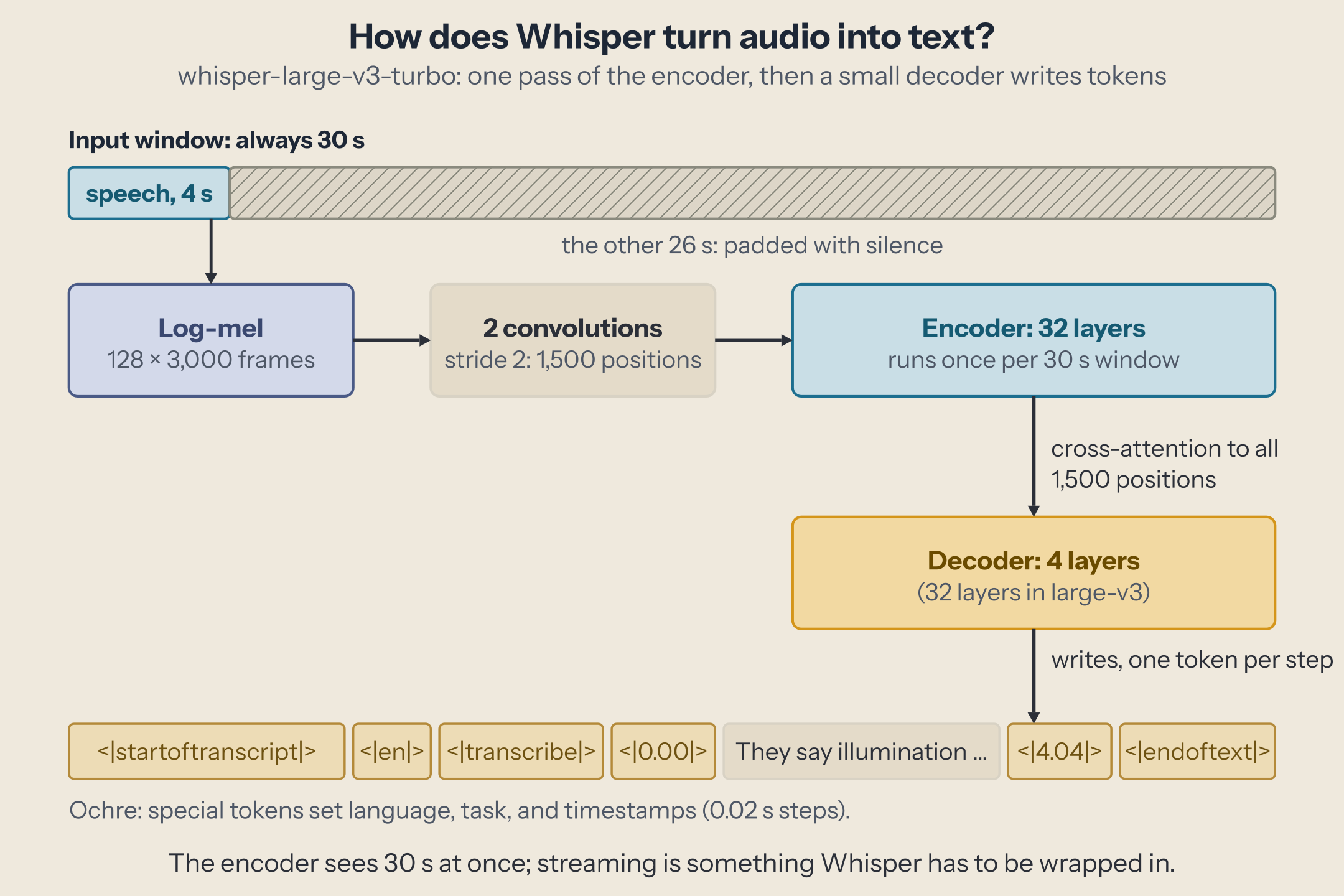
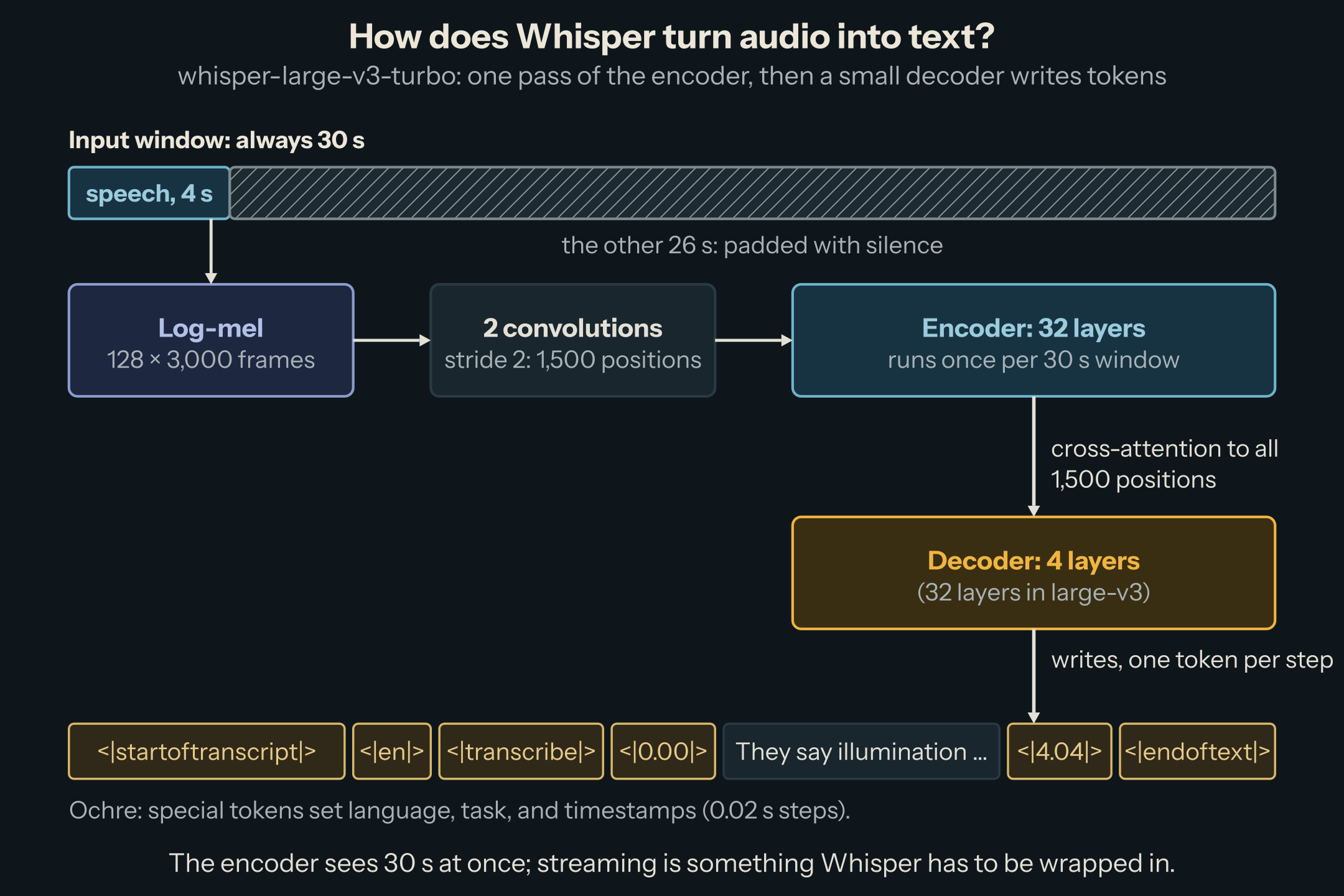
Three design choices explain how Whisper behaves in production:
- A fixed 30-second window. Every input is padded or cut to exactly 30 seconds: 3,000 frames, reduced to 1,500 positions by two convolutions. A 2-second voice command costs the encoder as much as 30 seconds of speech.
- The encoder runs once, the decoder many times. The encoder turns the window into 1,500 vectors; the decoder then writes one token per step, attending to all of them. This is the same prefill/decode split as an LLM, and the reason turbo's 4-layer decoder makes it much faster than large-v3.
- Special tokens steer the task. The decoder's prompt holds the language (
<|en|>), the task (<|transcribe|>or<|translate|>), and whether to emit timestamps, which come out as tokens like<|4.04|>, in 20 ms steps.
Serving Whisper with vLLM
vLLM serves Whisper like any other model, with OpenAI's audio endpoints:
$ vllm serve openai/whisper-large-v3-turbo
$ curl http://localhost:8000/v1/audio/transcriptions \
    -F model=openai/whisper-large-v3-turbo -F file=@meeting.wav \
    -F language=en -F response_format=verbose_json
response_format can be text, json, or verbose_json, which adds segments with start and end times (from those timestamp tokens). OpenAI's Python client works unchanged against it. Behind the endpoint, vLLM 0.31.0 decodes the file, resamples it to 16 kHz mono, and, if it is longer than 30 seconds, splits it into chunks of at most 30 seconds, cutting at the quietest moment near each boundary with one second of overlap. The chunks then run as separate requests in the same batch (source).
Two limits to know: uploads above 25 MB are refused (VLLM_MAX_AUDIO_CLIP_FILESIZE_MB), and so is audio longer than 600 seconds once decoded (VLLM_MAX_AUDIO_DECODE_DURATION_S). We hit the second one with a 10-minute test file. Raise them, or split long recordings yourself. And whisper-large-v3-turbo cannot translate, per vLLM's docs: for speech-to-English translation, serve large-v3.
Measured. We served whisper-large-v3-turbo with vLLM 0.31.0 on an NVIDIA GB10, 2026-10-06, and sent it the first 200 utterances of LibriSpeech test-clean (26 minutes of read English), then one 9-minute file. Word error rate (WER) uses Whisper's own text normalizer on both sides, so "Mr." and "mister" count as the same word.
| Workload | Wall time | Speed vs. real time | Median time per request | WER |
|---|---|---|---|---|
| 200 utterances, one at a time | 31.6 s | 49× | 0.15 s | 1.75% |
| 200 utterances, 16 at a time | 16.7 s | 94× | 1.25 s | 1.75% |
| 200 utterances, 64 at a time | 16.5 s | 95× | 4.96 s | 1.75% |
| One 9-minute file | 2.3 s | 232× | 2.33% |
What it shows:
- Batching works for audio too, up to a point. 16 requests at a time doubled throughput; 64 added nothing but waiting. Each request carries a full 30-second encoder pass, and those passes saturate the GPU early.
- Short clips are expensive. The utterances average 7.8 seconds, so each one pays for 30 seconds of encoder work: 200 encoder passes for 26 minutes of audio. The 9-minute file needs 19 passes for 9 minutes, and runs 2.5 times faster per second of audio. If you control the input, send longer audio, not many short pieces.
- Accuracy is excellent on clean read speech: fewer than 2 words in 100 wrong. Meetings, phone calls, accents, and noise are harder; test on your own audio.
Transcribing while people speak
A voice agent cannot wait for the end of a recording. It needs text while the person is still talking, and it needs to know when they stopped. Whisper was not built for that: it reads 30-second windows, and its encoder looks at the whole window at once, so it has to hear the end of a sentence before it can transcribe its beginning.
vLLM's stream=true option on the transcription endpoint does not change that. It streams the decoding of a complete file: on a 28-second clip, the first words arrived after 97 ms and the full text after 337 ms. Useful for showing text sooner, but the audio must already be complete.
There are two ways to transcribe live speech.
Wrap Whisper in chunks. The client cuts the incoming audio into pieces, usually at pauses detected by a voice activity detector (VAD), and sends each piece as a request. A word spoken at the start of a 2-second chunk waits for the chunk to fill, then for the request: we measured 107 ms for a 1-second chunk, 111 ms for 2 seconds, 132 ms for 5 seconds, 234 ms for 20 seconds. Short chunks answer fast but cut sentences, and Whisper is less accurate without context; tools that do this well transcribe overlapping windows and only confirm words two consecutive passes agree on (the LocalAgreement policy of whisper_streaming). The text arrives as partial results that may change, then final ones.
Use a model built for streaming. Some recent models encode audio causally, as it arrives, and emit text with a fixed delay. vLLM 0.31.0 serves them on a WebSocket, /v1/realtime, modeled on OpenAI's Realtime API: the client sends audio as base64 16-bit PCM at 16 kHz, the server sends text back as it is produced (protocol). In this release only two model families implement it: Mistral's Voxtral Mini 4B Realtime and Qwen3-ASR (which vLLM feeds in 5-second segments). Whisper does not.
async with websockets.connect("ws://localhost:8000/v1/realtime") as ws:
    await ws.recv()                                                   # session.created
    await ws.send(json.dumps({"type": "session.update", "model": MODEL}))
    await ws.send(json.dumps({"type": "input_audio_buffer.commit"}))  # start transcribing
    for chunk in microphone_chunks():                                 # 80 ms of 16 kHz PCM16 each
        await ws.send(json.dumps({"type": "input_audio_buffer.append",
                                  "audio": base64.b64encode(chunk).decode()}))
    await ws.send(json.dumps({"type": "input_audio_buffer.commit", "final": True}))
    # meanwhile, read {"type": "transcription.delta", "delta": "..."} events, then "transcription.done"
Voxtral Realtime has a configurable delay, from 80 ms to 2.4 seconds; Mistral recommends 480 ms as the balance between latency and accuracy. We fed it a 2.5-minute recording at real-time pace, in 80 ms pieces, as a microphone would, and measured when each sentence's text arrived after the sentence ended.
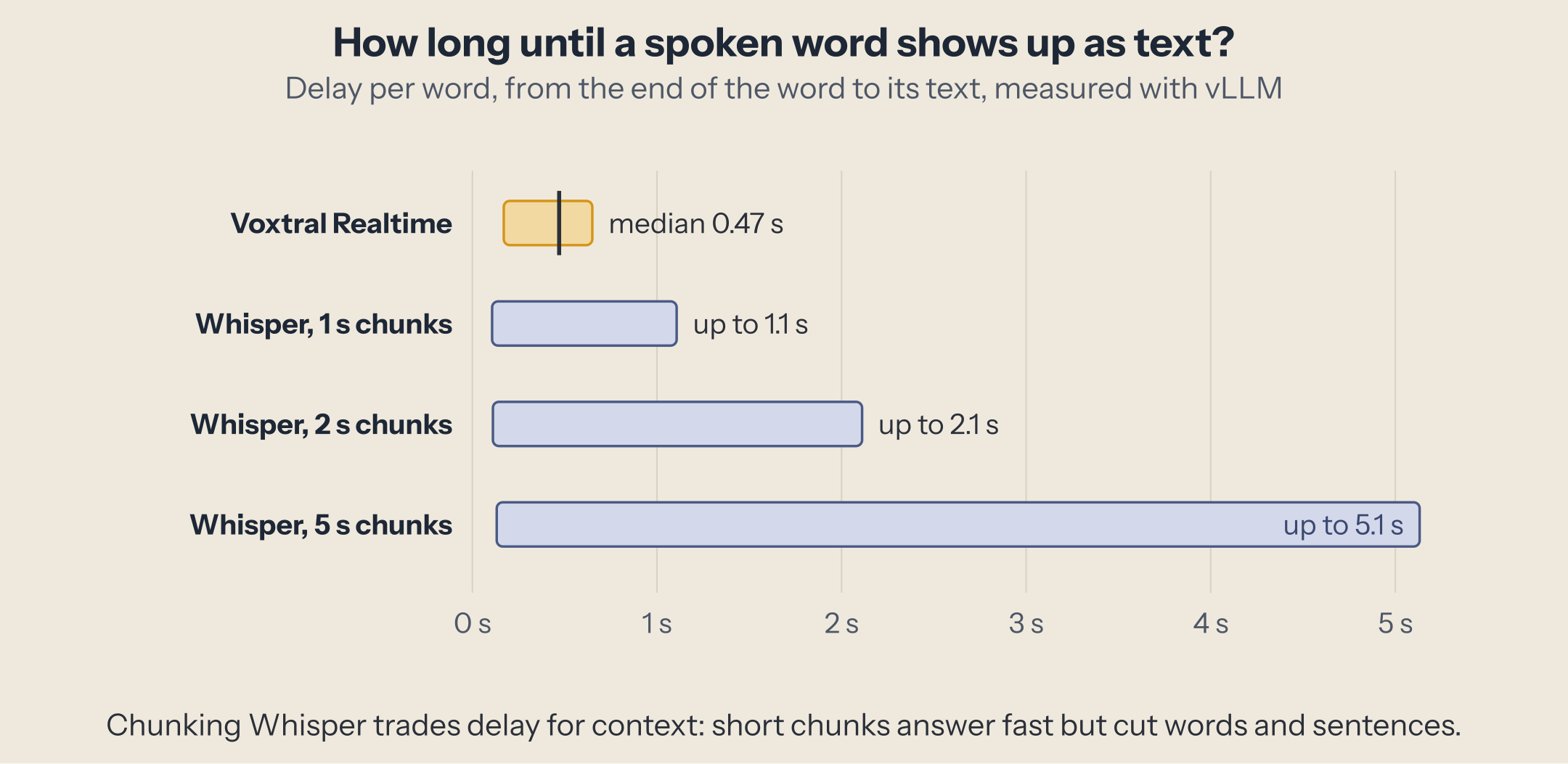
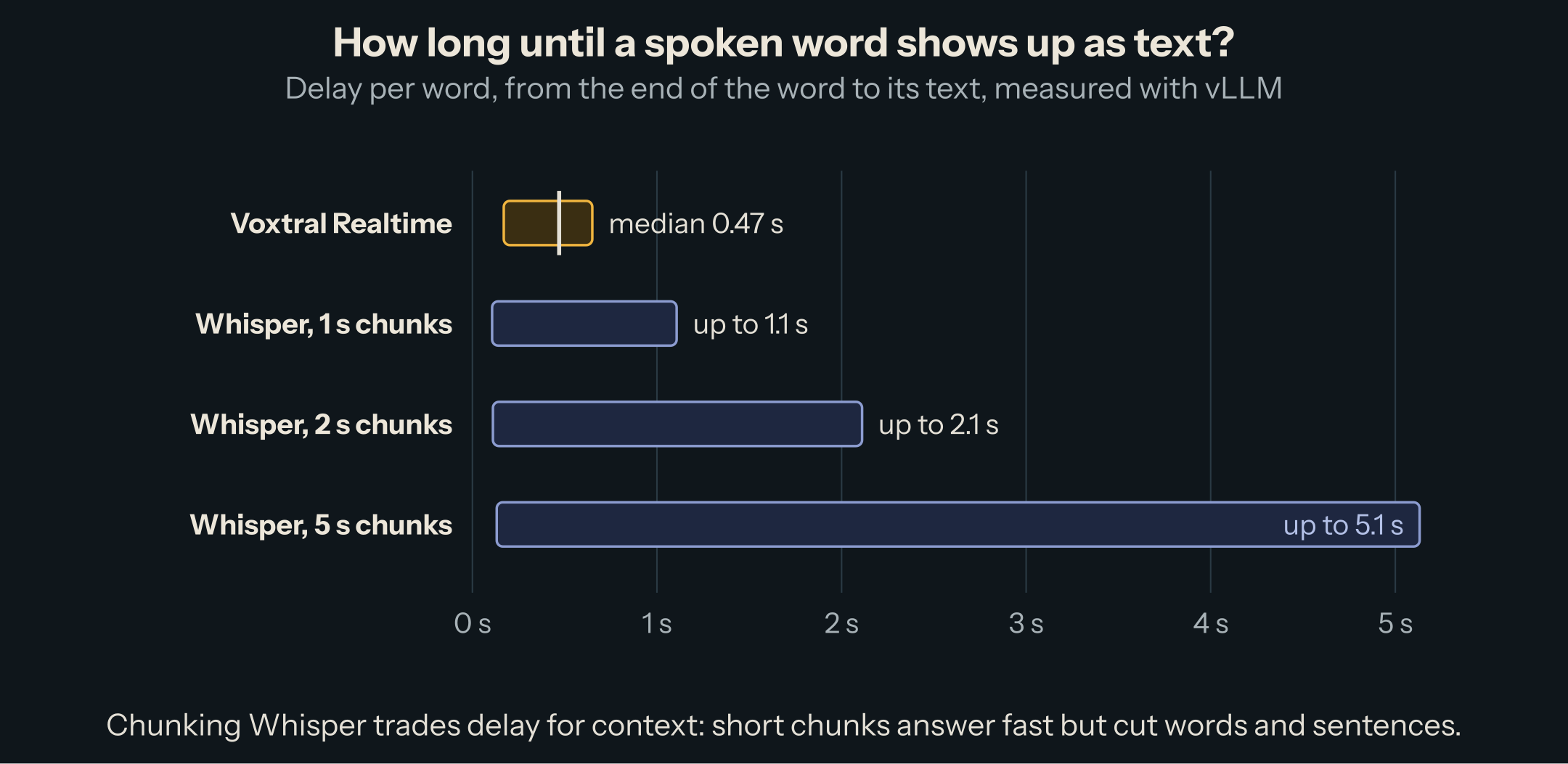
The text followed the voice by 0.47 seconds (median over 20 sentences, two runs, identical to within 5 ms), never more than 0.65 seconds, and the transcript had 0.5% word errors. One caution from the same run: the first session after the server started stalled for 39 seconds before catching up, and the following sessions did not. Send a warm-up stream before taking real traffic.
Who spoke when
A meeting transcript without speaker labels is hard to use. Labeling speakers, diarization, means splitting the audio by speaker and naming each part with an anonymous label (speaker 1, speaker 2), consistently through the recording. There are two routes.
A pipeline. Transcribe with Whisper, which gives segments with times. For each segment, compute a speaker embedding, a vector that captures the voice rather than the words, with a model such as ECAPA-TDNN. Then cluster the vectors: segments with similar voices get the same label. Dedicated diarization models (pyannote, NVIDIA's Sortformer) do the splitting more carefully, but the shape is the same: who spoke, computed separately, then merged with what was said.
One model. Some recent models are trained to transcribe and label speakers together. vLLM 0.31.0 returns their output with response_format=diarized_json, which today works with one model, MOSS-Transcribe-Diarize (0.9B parameters, Apache 2.0, up to 90 minutes in one pass):
$ vllm serve OpenMOSS-Team/MOSS-Transcribe-Diarize --trust-remote-code
$ curl http://localhost:8000/v1/audio/transcriptions \
    -F model=OpenMOSS-Team/MOSS-Transcribe-Diarize -F file=@meeting.wav -F response_format=diarized_json
Each segment comes back with start, end, text, and speaker (S01, S02, ...).
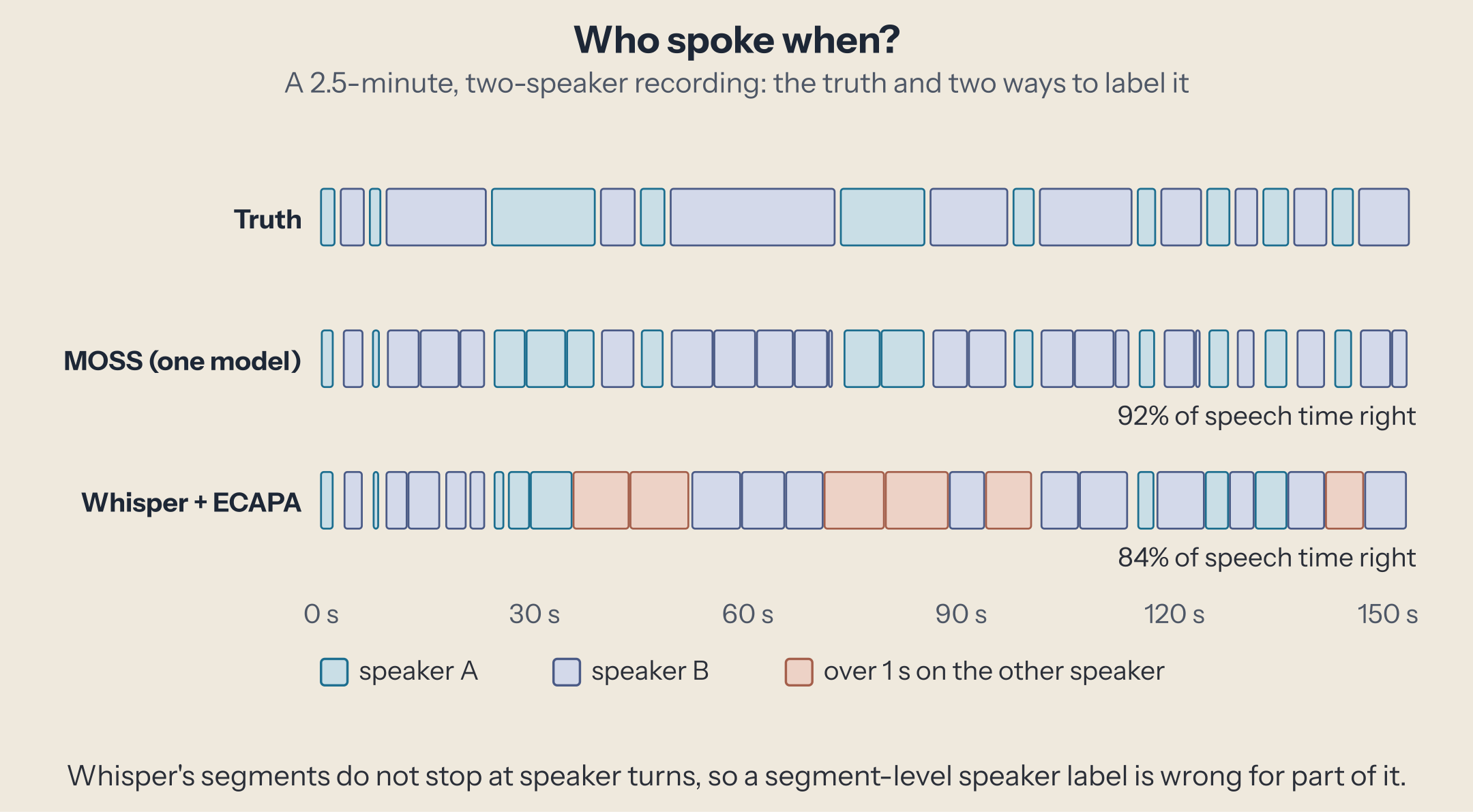
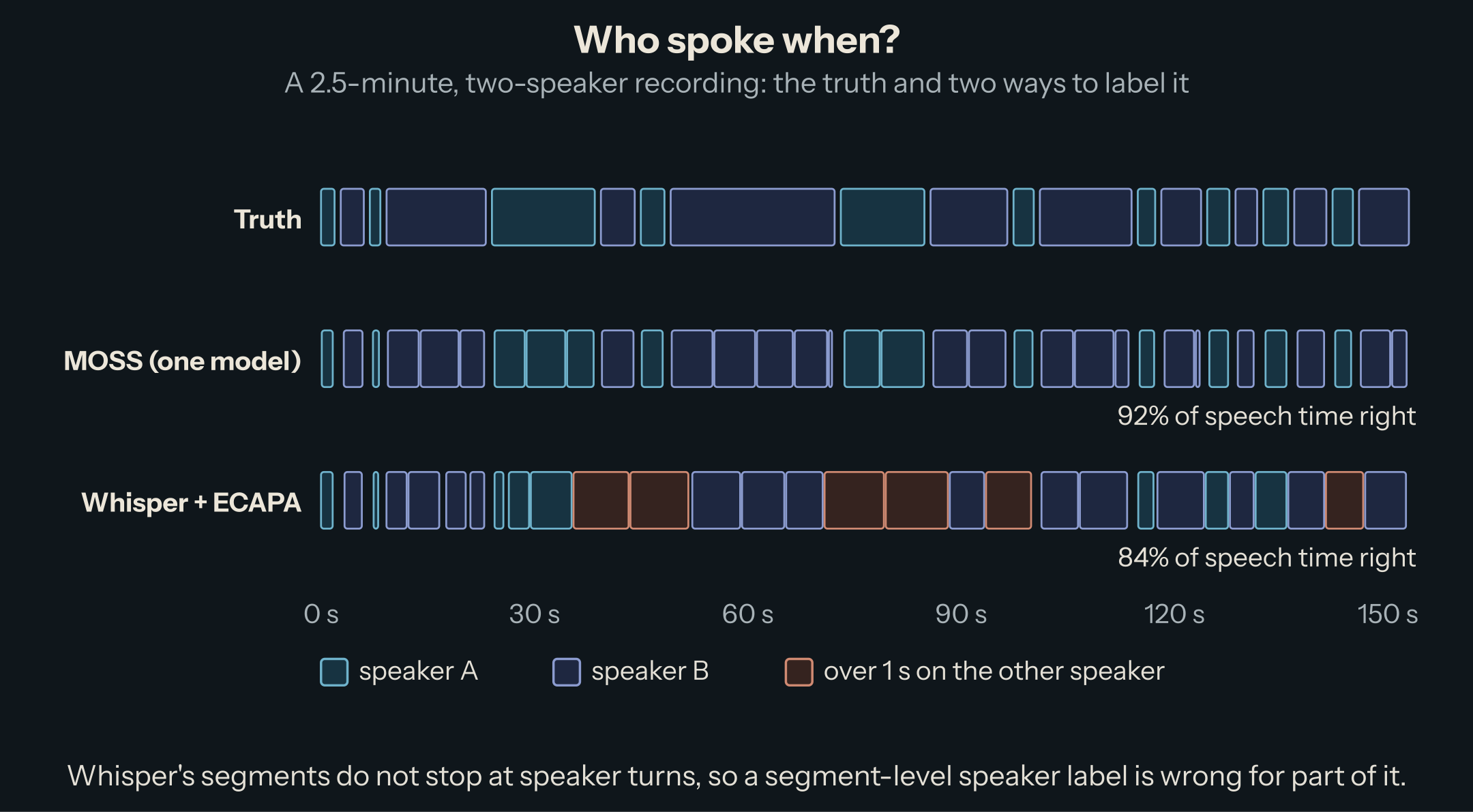
We built a test where the truth is known: two LibriSpeech speakers, alternating 20 times over 2.5 minutes, with 0.6-second gaps. Then we scored each route on the share of speech time labeled with the right speaker.
| Route | Speech time on the right speaker | Speakers found | WER |
|---|---|---|---|
| MOSS-Transcribe-Diarize, one pass | 92.4% | 2 | 0.25% |
| Whisper + ECAPA, told there are 2 speakers | 84.2% | 2 | 1.75% |
| Whisper + ECAPA, number of speakers found by a threshold | 83.6% | 3 | 1.75% |
The pipeline's errors are not about voices: the embeddings told the two speakers apart well. They come from the segments. Whisper cuts text where it makes sense as text, and seven of its 29 segments ran across a change of speaker, six of them by more than a second; a segment gets one label, so part of it is always wrong. MOSS cut at every turn. Its remaining 8% is mostly the edges of turns, where its segments start a little late and end a little early. On real meetings, with overlapping speech and short interjections, every system scores lower than on this clean test; the difference in kind remains.
Which to use
- Files, batch jobs, subtitles: Whisper large-v3-turbo on vLLM. Fast, accurate, and cheap to run: it needed 1.5 GiB for its weights. Send long files rather than many short ones, and raise vLLM's 600-second limit if you need to.
- Live captions and voice agents: a streaming model on
/v1/realtime, such as Voxtral Realtime. Choose the delay knowingly: Voxtral's model card puts its word error rate on FLEURS at 8.7% averaged over 13 languages at 480 ms, and 12.6% at 160 ms. Wrapping Whisper in chunks works, with more code and more delay. - Meetings and calls with several speakers: try a joint model such as MOSS-Transcribe-Diarize before building a pipeline. If you need a pipeline (a language it does not cover, an existing ASR system), split by speaker before transcribing rather than labeling Whisper's segments after.
Next
Recognition is half of a voice product. The next piece goes the other way, from text to speech: how today's models produce audio, and which ones lead.
This post is part of the Speech AI collection (1 of 3)

Inference engineering and AI in production — depth-first, no hype.
Inference Notes
Once a week: what changed in serving AI models, and what it means if you build, run or pay for them, in about five minutes.
Related Articles
Qwen3.8-Flash-Next, Layer by Layer
Qwen's preview of its next architecture, piece by piece: linear and sparse attention, a gated four-branch residual, 512 experts and an n-gram memory, and what each costs to serve.
Benchmark an Inference Server Without Lying to Yourself
Common load-test mistakes made on purpose next to the correct run, on one vLLM server, so each rule comes with how far it moves the numbers.
Rotations for 4-Bit Activations: QuaRot, SpinQuant, and Friends
A rotation flattens activation outliers and, on real layers, rescues INT4 activations. On Qwen3-8B in NVFP4, it cost 5 GSM8K points instead.