How a Computer Stores a Real Number: Sign, Exponent, Mantissa
Here is a number from a real model: 0.02294921875. It is one of the 8 billion weights of Qwen3-8B, and it is stored in 16 bits. Store the same weight in 8 bits and it becomes 0.0234375. Store it in 4 bits and it becomes 0.
Those three results are not accidents. They follow from how computers store real numbers, a scheme called floating point. Every format you meet on a model card or an engine flag (FP32, BF16, FP16, FP8, FP4) is a variant of it. This article explains how the scheme works, why the variants differ, and how to predict what a format will do to your numbers.
Scientific notation, in binary
You already know the idea. A physicist writes the speed of light as 2.998 × 10⁸ m/s: a few significant digits (2.998) and a power of ten that says where the decimal point goes (10⁸). Big and small numbers take the same space, because only the exponent changes.
A floating-point number does the same thing in base 2, with three fields:
- Sign (1 bit): 0 for positive, 1 for negative.
- Exponent (a few bits): which power of two to multiply by. It sets how large or small the number can be.
- Mantissa (the rest): the significant digits, in binary. It sets how precisely the number is stored. (It is also called the significand or the fraction.)
The value is:
value = (−1)^sign × 1.mantissa × 2^(exponent − bias)
Two details make this work.
The hidden 1. In binary, the first significant digit of any non-zero number is always 1. Writing it down would waste a bit, so formats leave it out and store only the digits after the point. A 23-bit mantissa gives 24 bits of precision.
The bias. The exponent must cover negative powers (for 0.1) and positive ones (for 1000). Instead of spending a bit on its sign, the format stores the exponent plus a fixed offset, the bias. FP32 has 8 exponent bits, so stored values go from 0 to 255, and the bias is 127: a stored 127 means 2⁰, a stored 123 means 2⁻⁴, a stored 130 means 2³.
Here is 0.1 in FP32, the standard 32-bit format (IEEE 754 single precision). Its 32 bits, in hexadecimal, are 3DCCCCCD:
0 01111011 10011001100110011001101
│ │        └ mantissa: 1.10011001100…₂ = 1.6000000238…
│ └ exponent: 123, minus the bias 127 = −4
└ sign: 0, positive

value = 1.6000000238 × 2⁻⁴ = 0.100000001490116…
The stored value is not exactly 0.1. In binary, 0.1 is an infinitely repeating fraction (0.000110011001100…), as 1/3 is in decimal, so it must be cut off somewhere. The format rounds to the nearest number it can represent (on an exact tie, to the one whose last bit is 0). Every format in this article rounds this way; all that changes is how many bits there are to round to.
The gaps double at every power of two
A mantissa of m bits gives 2^m possible values for each exponent. So between 1 and 2 there are exactly as many representable numbers as between 2 and 4, or between 1024 and 2048. The numbers between 2 and 4 are spread over twice the distance, so the gap between neighbors is twice as large.
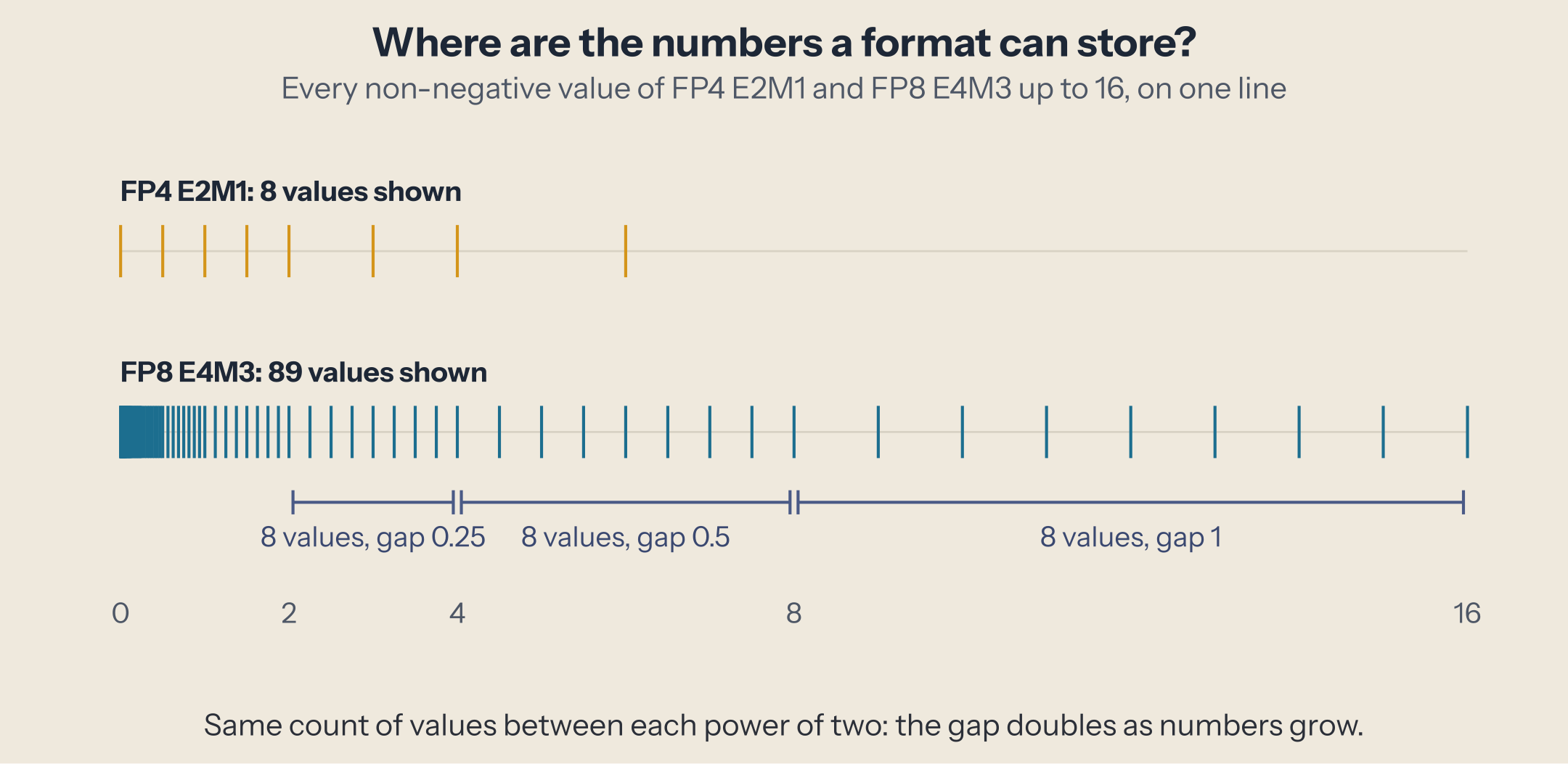
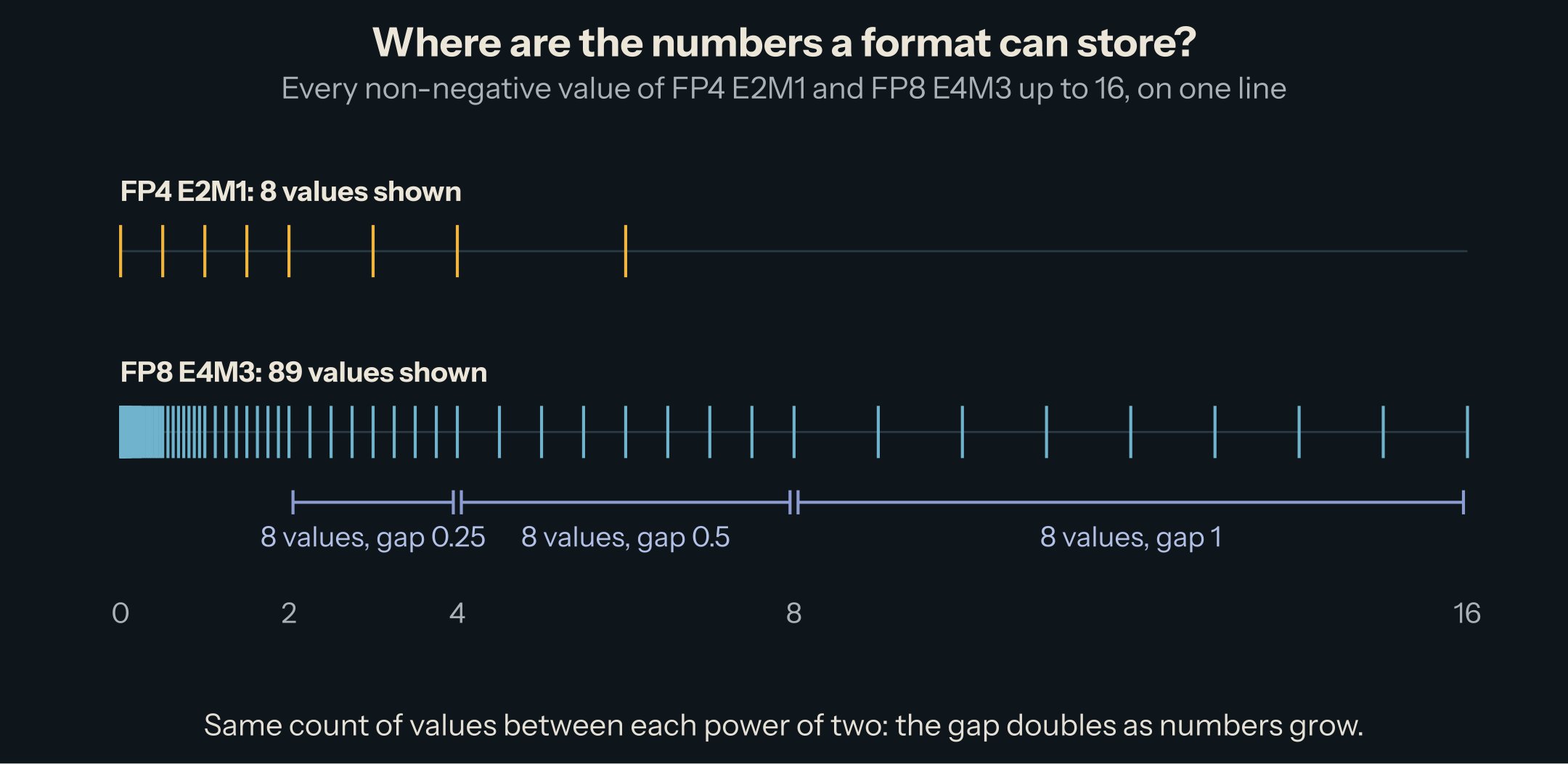
This is the most useful fact about floating point: the error is relative, not absolute. A small number is stored with a small error, and a large number with a large error, but the error as a percentage of the number stays roughly the same. One number captures this percentage: the gap between 1 and the next representable number, called machine epsilon. It is 2⁻ᵐ, so it depends only on the mantissa bits. For FP32, with 23 mantissa bits, it is about 0.00000012, roughly 7 significant decimal digits.
Relative error has a consequence that surprises people. Once numbers are large enough, the gap is bigger than 1, and adding 1 changes nothing:
float32(16777216) + 1   →  16777216     (2²⁴: the gap is now 2)
bfloat16(256) + 1       →  256          (BF16 has 7 mantissa bits: the gap at 256 is 2)
float16(0.1) + float16(0.2)  →  0.2998
Range or precision: how formats spend their bits
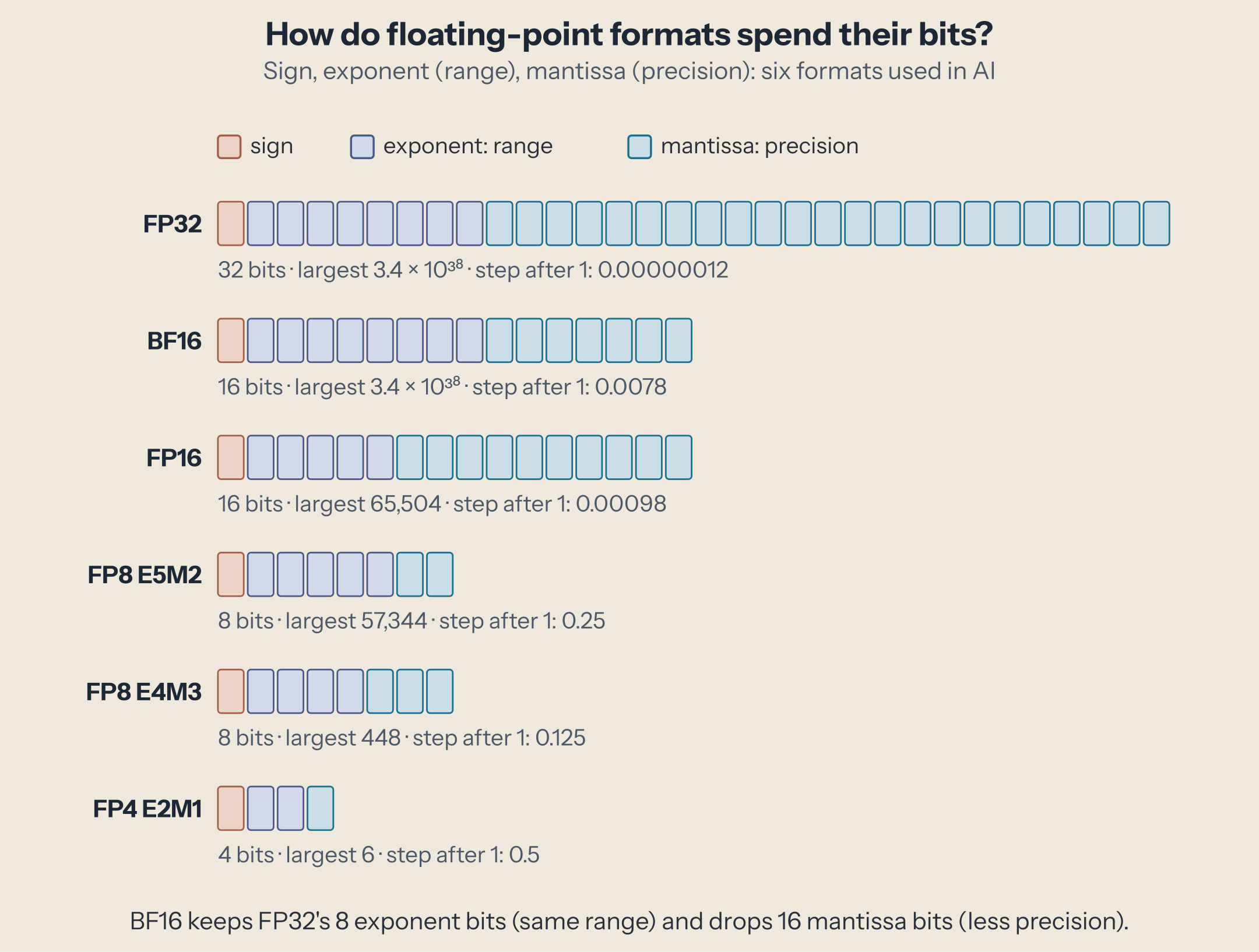
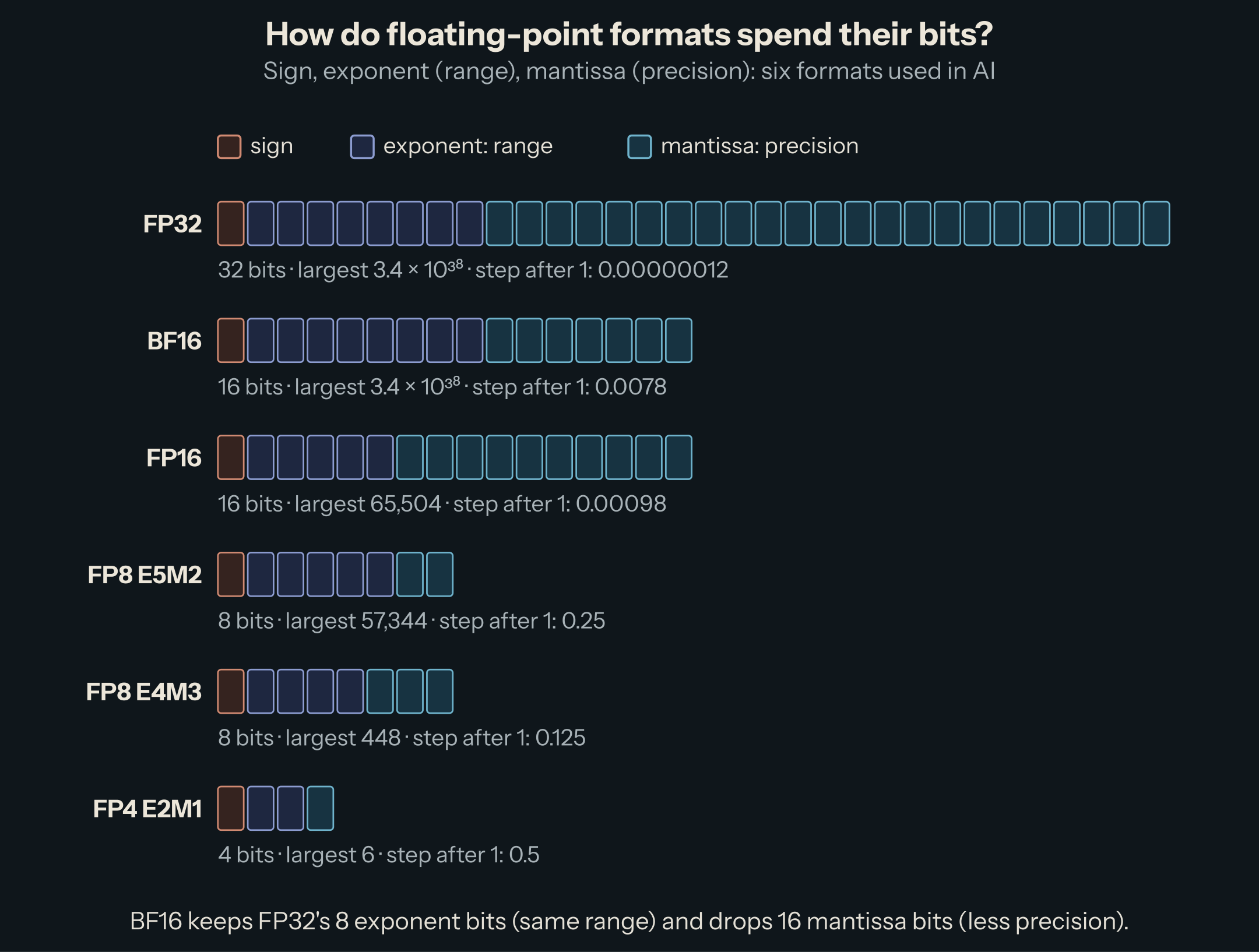
With a fixed number of bits, every bit you give the exponent is a bit the mantissa does not get. More exponent bits reach larger and smaller numbers (range). More mantissa bits make the gaps smaller (precision). Format names in AI spell out the split: E4M3 means 4 exponent bits and 3 mantissa bits, plus the sign bit, so 8 bits in all.
| Format | Bits (sign, exponent, mantissa) | Largest value | Smallest normal value | Step after 1 (epsilon) |
|---|---|---|---|---|
| FP32 | 1, 8, 23 | 3.4 × 10³⁸ | 1.2 × 10⁻³⁸ | 0.00000012 |
| BF16 | 1, 8, 7 | 3.4 × 10³⁸ | 1.2 × 10⁻³⁸ | 0.0078 |
| FP16 | 1, 5, 10 | 65,504 | 0.000061 | 0.00098 |
| FP8 E5M2 | 1, 5, 2 | 57,344 | 0.000061 | 0.25 |
| FP8 E4M3 | 1, 4, 3 | 448 | 0.016 | 0.125 |
| FP4 E2M1 | 1, 2, 1 | 6 | 1 | 0.5 |
Read the table in pairs:
- BF16 and FP16 are both 16 bits and split them differently. BF16 keeps FP32's 8 exponent bits, so it has the same range as FP32, and keeps only 7 mantissa bits, so it has about 2 significant decimal digits. FP16 keeps 10 mantissa bits (about 3 digits) and pays with its range: nothing above 65,504.
- E5M2 and E4M3 make the same choice at 8 bits. E5M2 reaches 57,344 with steps of 0.25 near 1; E4M3 stops at 448 with steps of 0.125.
- FP4 E2M1 has only 16 bit patterns. The positive ones are 0, 0.5, 1, 1.5, 2, 3, 4, and 6: every value is on the first number line above.
The edges: zero, tiny numbers, infinity, and NaN
The rule "1.mantissa × 2^exponent" cannot produce zero, because of the hidden 1. So formats reserve some bit patterns:
- Zero is the pattern with exponent and mantissa all zeros. Because the sign bit stays free, there is a +0 and a −0. They compare equal.
- Subnormal numbers fill the space between zero and the smallest normal number. When the stored exponent is 0, the hidden 1 becomes a hidden 0, and the format can step down to zero in even gaps instead of jumping. In FP16, the smallest normal number is about 0.000061 and the smallest subnormal is about 0.00000006. They have fewer significant bits, so they are less precise: 0.00001 in FP16 is stored as 0.0000100136.
- Infinity and NaN ("not a number", the result of 0/0 or ∞ − ∞) use the largest exponent pattern in FP32, FP16, BF16, and FP8 E5M2. A number too large for the format becomes infinity: 70,000 in FP16 is ∞.
The smallest formats cannot afford to spend whole exponent values on special cases. FP8 E4M3 has no infinity and keeps a single NaN pattern (all ones after the sign), which is how it reaches 448 instead of 240 (FP8 paper, Table 1). FP4 E2M1 has neither infinity nor NaN: all 16 patterns are numbers (OCP MX spec, Table 5). So what happens to a number too large for E4M3? The specification leaves the choice to the conversion: either saturate (store the largest value, 448) or produce NaN. Libraries differ: NumPy's ml_dtypes returns NaN for 70,000 in E4M3; the widget below saturates.
Try it
Type a number, or pick a preset, and see how each format stores it. Click a row to decode the bits.
A few things to try:
- 0.1: none of the six formats stores it exactly, and FP4 rounds it to 0.
- 300: FP16 and BF16 store it exactly. E4M3 stores 288, because between 256 and 448 its gap is 32. E5M2 stores 320 (gap 64).
- 70000: too large for FP16 (∞) and both FP8 formats. BF16 stores 70,144, off by 0.2%: the precision is poor, but the number survives.
- a tiny gradient (0.00001): FP16 keeps it as a subnormal, E4M3 rounds it to 0.
Why this matters for AI
A model is billions of numbers: weights, activations, gradients, and the KV cache. The format decides how many bytes each one takes, so it decides how much memory the model needs and how fast the GPU can move it. Halving the bits halves both. The question is always what the model can tolerate losing, range or precision.
Training first chose range. In 2017, NVIDIA and Baidu researchers showed how to train in FP16 ("Mixed Precision Training"). FP16's narrow range was the obstacle: small gradients fall below its smallest subnormal and become zero. A gradient of 0.00000001 is 0 in FP16 and 0.0000000100117 in BF16. Their fix was to keep an FP32 copy of the weights and to multiply the loss by a scale factor, which shifts the gradients up into FP16's range ("loss scaling"). Google took the other route with BF16 on its TPUs: keep FP32's exponent, and give up mantissa bits instead. In Google's words, "neural networks are far more sensitive to the size of the exponent than that of the mantissa", and BF16 "comes close to being a drop-in replacement for FP32", without loss scaling. Converting FP32 to BF16 also only means rounding away the low 16 bits. Most open models are released in BF16, which is why the 0.02294921875 at the top of this article is exact in BF16.
Inference goes lower. For serving, 8-bit and 4-bit formats cut memory again, at a price you can now predict. E4M3 can only represent values up to 448 and has 3 mantissa bits; E2M1 has eight positive values in total. The weights of a layer do not fit that range by themselves: the weight at the top of this article becomes 0 in FP4. So low-bit formats are always used with a scale factor: multiply a group of numbers by a scale so they land where the format has values, store the scale next to them, and undo it when reading. How many numbers share one scale, and in what format the scale is stored, is the difference between FP8 per-tensor, MXFP4, and NVFP4.
What to take away
- A float is a sign, an exponent, and a mantissa:
(−1)^s × 1.m × 2^(e − bias). - Exponent bits buy range, mantissa bits buy precision. A format name like E4M3 tells you the split.
- The gap between neighbors doubles at every power of two, so errors are relative: about 2⁻ᵐ of the value.
- Small formats drop special values (E4M3 has no infinity, FP4 has no NaN) and need a scale factor to be useful.
The next piece puts the two 16-bit formats side by side: FP16 vs. BF16, same size, different trade, and why one of them won.
This post is part of the Number Formats for AI collection (1 of 9)

Inference engineering and AI in production — depth-first, no hype.
Inference Notes
Once a week: what changed in serving AI models, and what it means if you build, run or pay for them, in about five minutes.
Related Articles
Where Low Precision Bites: Rounding, Overflow, and Accumulation
Five places where low precision breaks real computations, each reproduced on Qwen3-8B's own tensors, and the fix every serious implementation applies.
NVFP4: Two Levels of Scale
How NVFP4 differs from MXFP4: 16-value blocks, FP8 block scales, and a per-tensor scale, with what each part buys measured on Qwen3-8B.
Which GPU Computes Which Format: Ampere to Rubin, MI300 to MI355
Which number formats each data-center GPU computes natively, at what rate, from the vendors' own pages: A100 to Rubin, MI300X to MI355X.